
Articles
Assistant Memory Summarizer: keeps long chats useful
When an assistant conversation grows long, this agent compacts it into a short note that keeps names, IDs, decisions and open requests, so the next turn keeps the thread.
Board File Agent: drafts boards, flows and kanban layouts
Board File Agent drafts or revises a board for you: shapes, connections, notes and kanban columns. It has no tools. Another part of Worknano writes the file after you confirm.
Chart Analyst: a short, honest reading of any dashboard chart
Chart Analyst reads a dashboard chart summary and tells you what it shows, what stands out and what to do next. It is read-only and never invents numbers.
Chat Agent: answers a mention in a thread with real data
Mention the assistant in any chat thread. Chat Agent reads the records you may see, answers for the whole thread, and shows a confirmation card before it changes anything.
Content Writer: writes and improves short text anywhere
Generate or polish a description, label or website block in the tone and language you pick. Content Writer returns only the text, ready to use.
CRM Assistant: the agent that keeps companies, contacts and deals in order
CRM Assistant works on your CRM page. It finds companies, contacts and deals, moves deals through stages, and proposes changes you confirm before anything is saved.
Dashboard Assistant: build dashboards and widgets by asking
Dashboard Assistant creates dashboards, adds and edits widgets, and arranges the grid on your Dashboards page. You describe the chart, it drafts the widget, you confirm.
Data Hygiene Assistant: finds missing data and helps you fix it
Data Hygiene Assistant reports where your records miss owners, dates or updates, then works through one rule at a time and proposes fixes you confirm. It never guesses a value.
Design File Agent: drafts slides, posters and layouts as design files
Design File Agent drafts or revises a design file: pages, text, shapes and cards in your brand colours. It has no tools. The Docs Assistant writes the file after you confirm.
Docs Assistant: write, read and organise documents with an agent
Docs Assistant creates and edits documents, boards, designs and sites on your Docs page, reads and summarises file text, and asks specialist agents when a file needs drafting.
Domain Config Planner: plans the build before anything is built
For a bigger request, Domain Config Planner checks what already exists, asks at most one focused question, and plans the models, pages and workflows in the right order.
Domain Data Generator: fills model fields with typed values
A workflow step that turns a prompt into values for the fields of your models. The result always matches the schema the application provides, so it can be saved as it is.
Endpoint Response Model Generator: from an API response to a model
Test an API endpoint, then let this agent read the response and propose a flat data model plus the field mappings that sync it into Worknano.
Form Designer: drafts a complete form from a short description
Describe who fills in the form and what you need to know. Form Designer drafts the steps, questions, scoring and logic as a draft form you can review before anything goes live.
Generic Assistant Planner: the assistant behind your page sparkles
The default assistant for any page. It answers questions about the data on that page, finds and counts records, and proposes changes that you confirm first.
Image File Agent: turns an image idea into a clear brief
Image File Agent writes a short, concrete brief for an image file: subject, composition, colours, text and what to keep. It does not change pixels. You or the editor act on the brief.
Key Result Validator: checks that a key result is measurable
Run it on a key result and get a clear verdict: valid, or the exact fields to change and why. It checks title, start value and target, and fit with the objective above it.
Meta Data Assistant: build and change your setup by talking to it
Describe a module, model, page, form or automation. Meta Data Assistant drafts it, shows you a card to confirm, and keeps going in your language.
Model Designer: turns a description into database models
Tell Worknano what you want to track. Model Designer drafts the tables, typed fields, links and choice lists as models you review before they change your workspace.
Model Editor: changes one model without breaking the rest
Ask for a new field, a changed label or new choices. Model Editor returns a small, targeted edit plan for one model and leaves everything unrelated as it was.
Module Creator: drafts a new module from a plain description
Describe a business area, such as hiring or inventory, and Module Creator drafts a module with related models, statuses and relationships for you to review.
My Agent: your personal assistant for tasks, OKRs and deals
My Agent works on your My page. It stays on your own tasks, key results, deals and approvals, briefs you on what to focus on, and proposes edits you confirm.
Objective Validator: checks an objective against its goal and key results
Run it on an objective to see if it is clear, aligned with a mid-term goal and measurable through its key results. It recommends only the fields that should change.
OKR Assistant: updates and explains your OKRs in plain words
Ask about objectives and key results on the OKR page. OKR Assistant reads, summarises and proposes updates that you confirm, and it knows labels such as O-426 and KR2.
Organization Assistant: manage teams, people and brand in plain words
Organization Assistant helps with teams, users, roles and brand identity on your Organization page. It resolves names to records and proposes changes you confirm.
Page Creator: drafts a page that fits your data
Describe who uses a page and what they do there. Page Creator drafts sections from your existing models, with a board, cards, calendar or table, whichever suits the data.
Page Editor: changes one page and keeps everything else in place
Ask for new columns, filters, an editable value in the row or a button for a workflow action. Page Editor returns a small edit plan and keeps unrelated sections untouched.
Permission Manager: sets who can create, read, update and delete
Describe who should see and change a model. Permission Manager drafts a complete permission policy with real role IDs, least privilege, and no loss of existing access.
Task Assistant: the agent that runs your Projects page with you
Ask in plain words, and Task Assistant finds tasks, assigns work, moves statuses and answers how a project is going. Every change is a preview you confirm first.
Task Summarizer: a short, factual summary of one task
Open a long task and get two to four factual sentences: what it is, its status and priority, who owns it, the key dates and whether it looks on track.
Web File Agent: drafts and revises the content of a website file
Web File Agent drafts or revises a Worknano website file. It has no tools and does not explain itself. The Docs Assistant writes the result to the file.
Workflow Creator: turns an automation request into a workflow
Say what should happen and when, for example notify the owner when a deal is won. Workflow Creator drafts the trigger, conditions and effects for the right model.
Workflow Editor: changes one workflow without weakening it
Ask for a changed condition, another notification or a new action. Workflow Editor edits one workflow, keeps stable action names and never loosens conditions on its own.
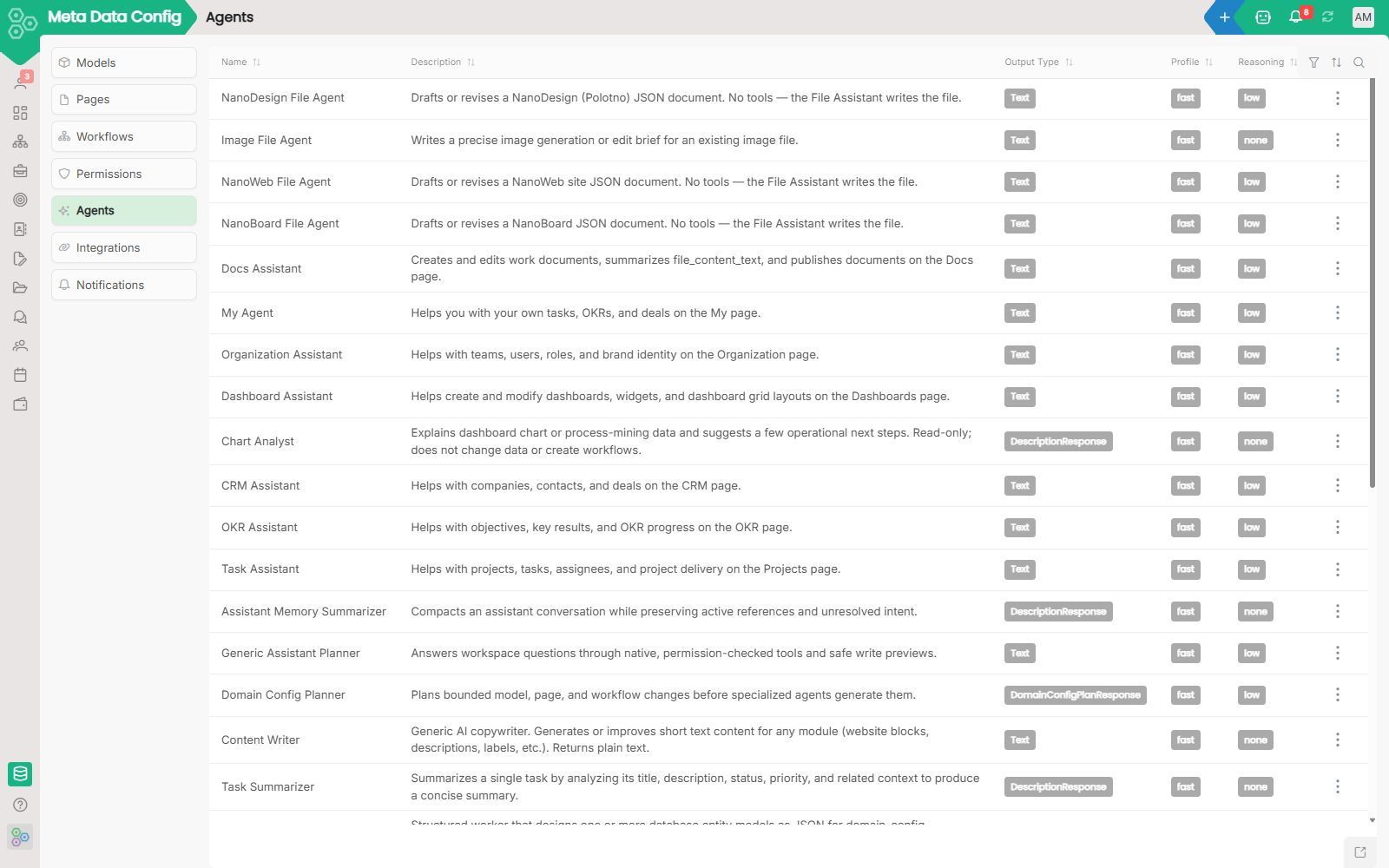
AI Agents: automate tasks with prompts, not code
Every workspace accumulates work that follows a pattern: read this record, summarise it, draft a reply, classify the input, generate a document. Doing it manually every time is waste.
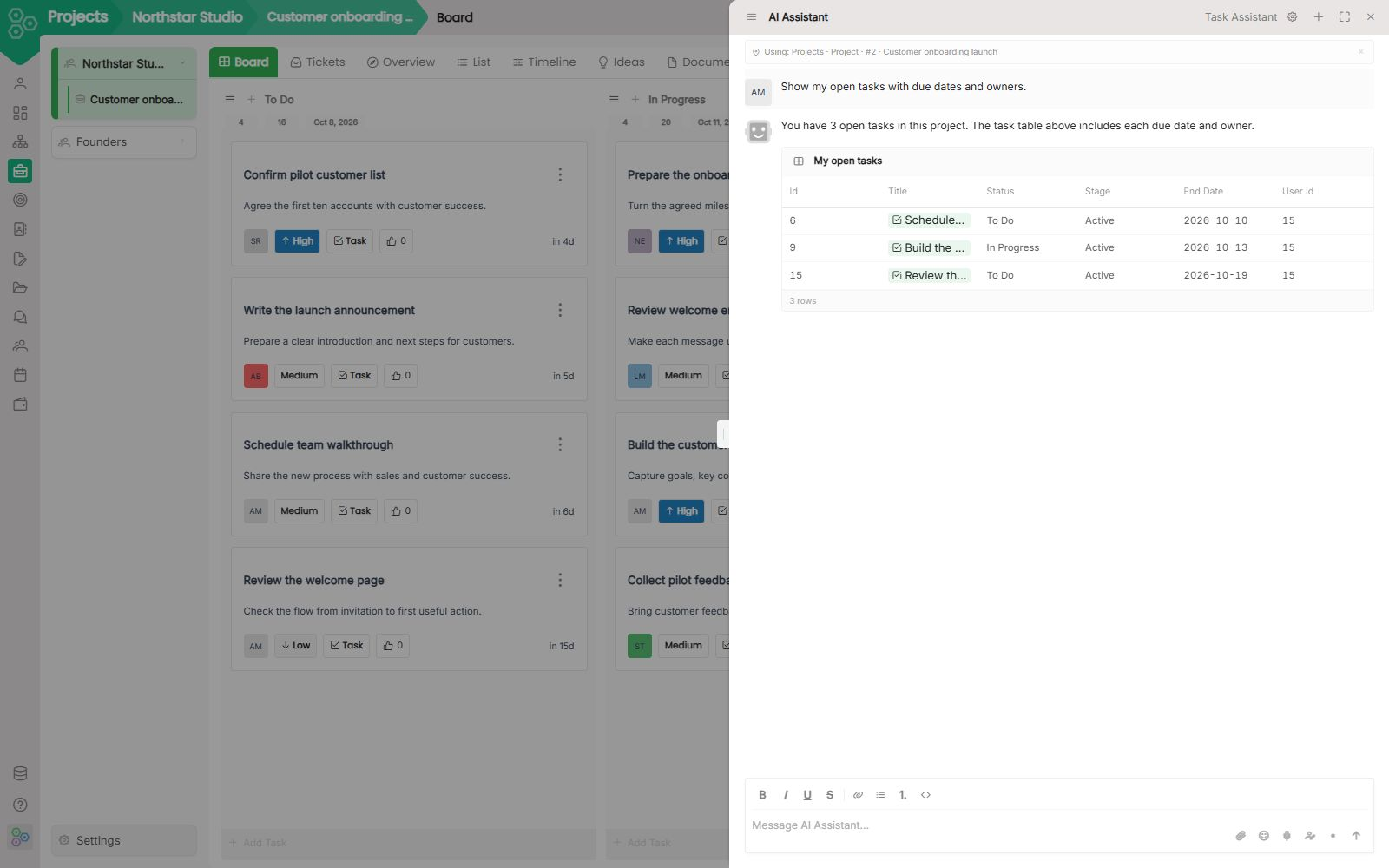
AI Assistant: ask about the page you are on
Sparkles or Ctrl/Cmd+J opens a chat that already knows the screen in front of you. Ask about your tasks, deals, or key results without leaving the page.
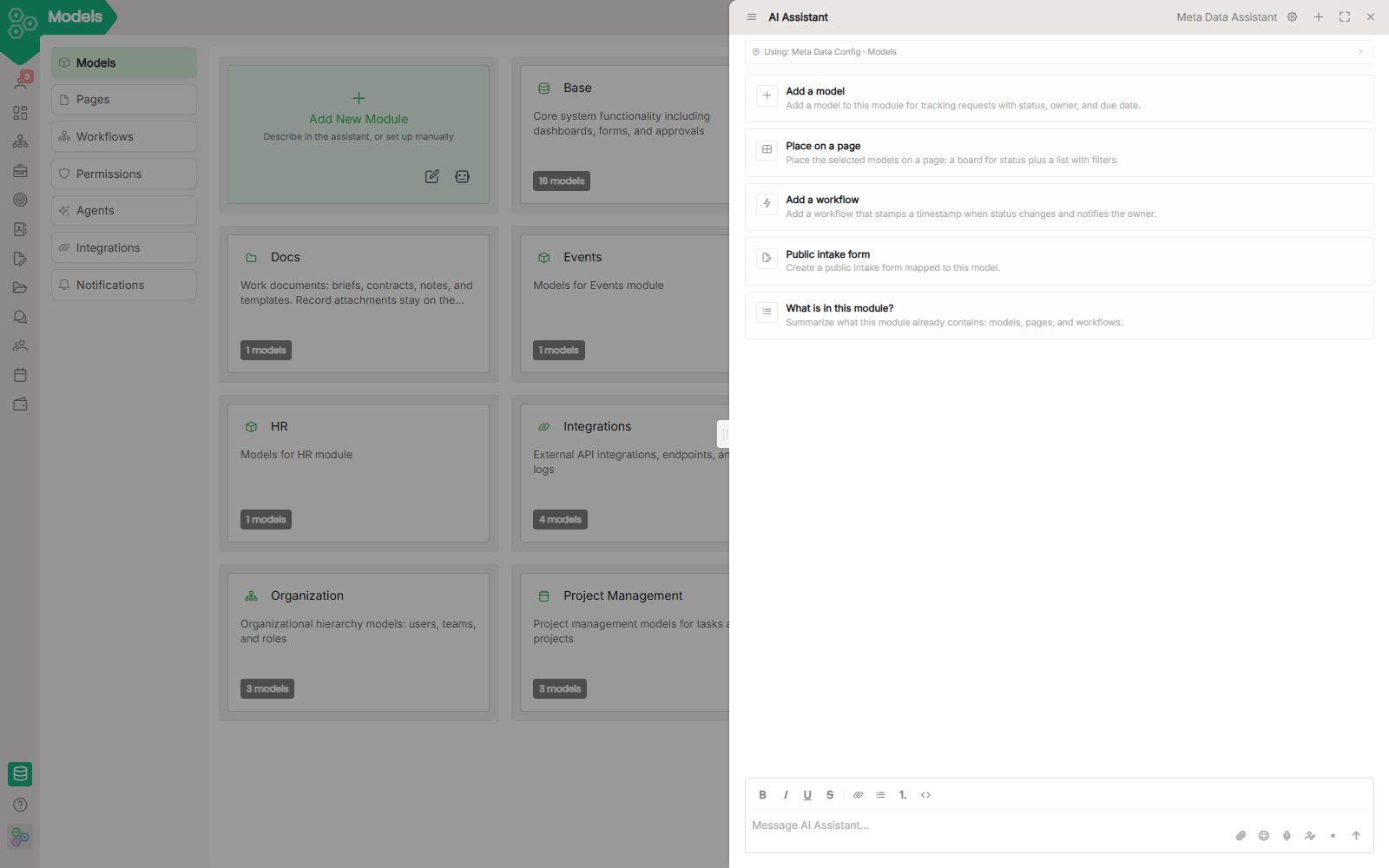
Module Builder: Create exactly the modules your business needs
Every module you create in Worknano is deeply connected to everything else, workflows, permissions, files, reporting, AI Agents, and process mining.
Worknano API: Clean, Consistent, and Extremely Flexible
Worknano is more than an all-in-one workspace. It is a complete operating system for ambitious startups and growing teams.
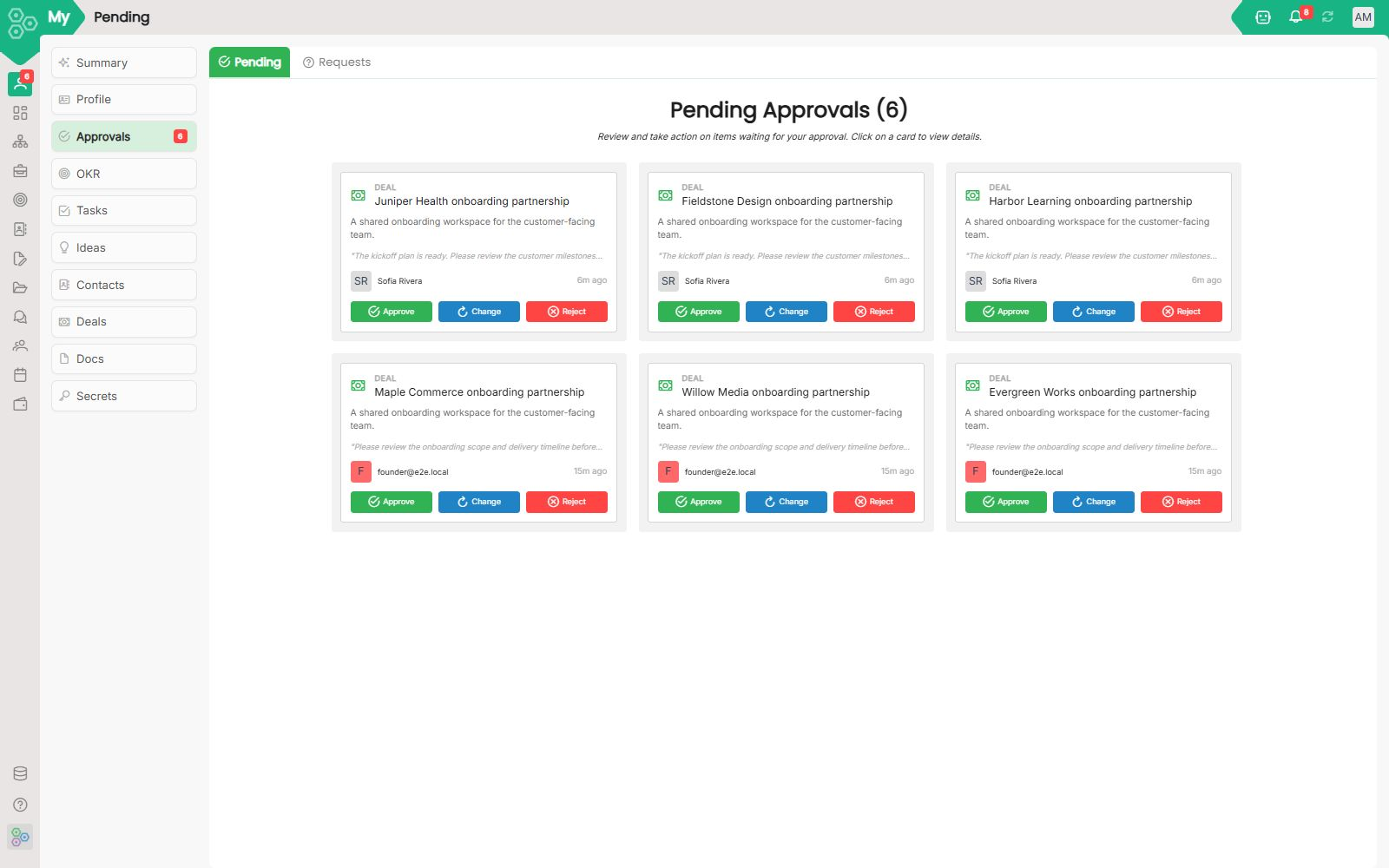
Stop chasing people for signatures. Build automated approval workflows that just work.
The Approvals module turns the frustrating "let me get back to you" delay into a smooth, tracked workflow. Instead of sending Slack messages or endless follow-up emails, your team can submit requests and get formal sign-offs automatically.
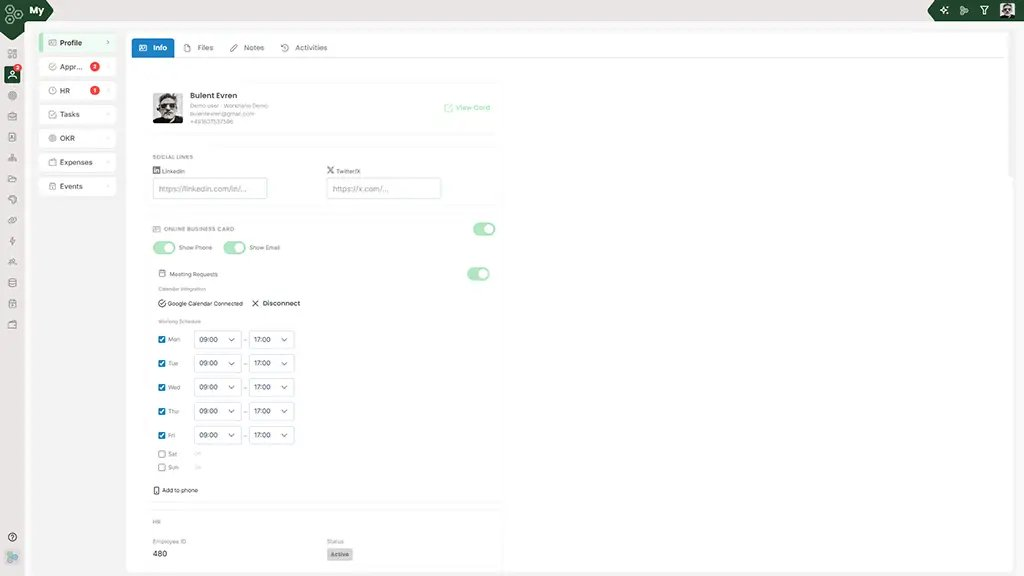
Meeting booking built into your team profiles, not tacked on
Most scheduling tools require you to manage messy external links that sit outside of your main business profile. Worknano Booking integrates your calendar right into your public-facing team presence.
Boutique Hotel Chain: From Manual Chaos to Instant Bookings
"We scoped a 6-month, €45k custom build, but it was just too much.
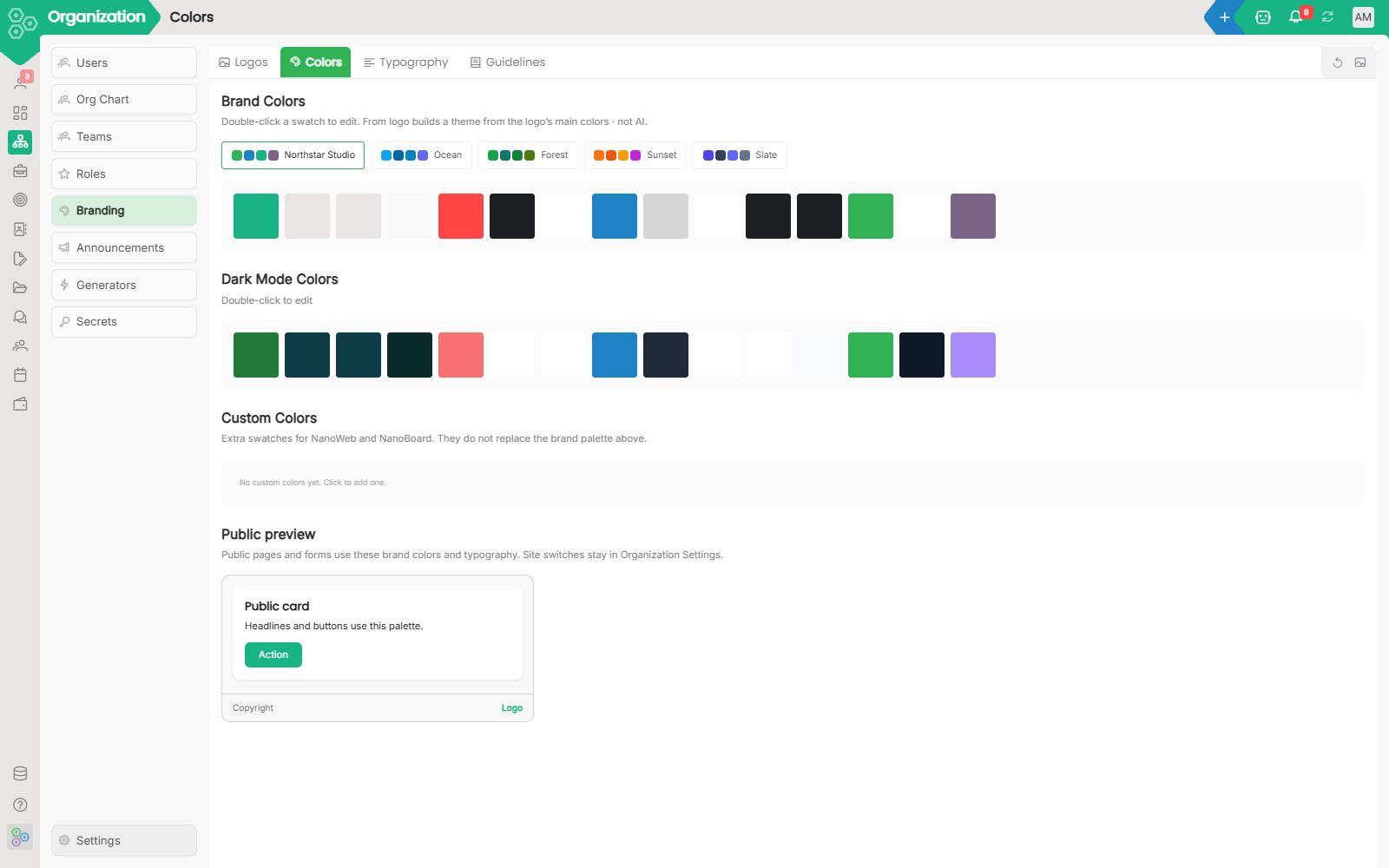
Your brand, in one place not scattered across ten tools.
Process Mining: See how work actually flows through your workspace Every team has a written process and a real process. The written one lives in a slide deck.
Build your own agent: from a default to a custom helper in minutes
An agent in Worknano is a name, instructions, tools and a model. Duplicate a default, start blank or ask the Meta Data Assistant, then attach it to a page, a workflow or a chat.
Building your 21st module with AI: a working playbook
Every business has at least one module that no off-the-shelf SaaS quite covers. A bespoke compliance tracker for a regulated industry. A donor-care system for a non-profit. Worknano's data-model designer plus AI assistance closes the gap from weeks to an afternoon.
Can I migrate existing data?
Yes. CSV and Excel imports are supported out of the box and map directly into CRM, Projects, and HR with auto-suggested field mapping.
Can we self-host or get a dedicated instance?
Single-tenant on-prem deployments and dedicated private infrastructure are available on the Enterprise plan. The standard SaaS uses per-subdomain tenant isolation so your data never touches another customer's environment.
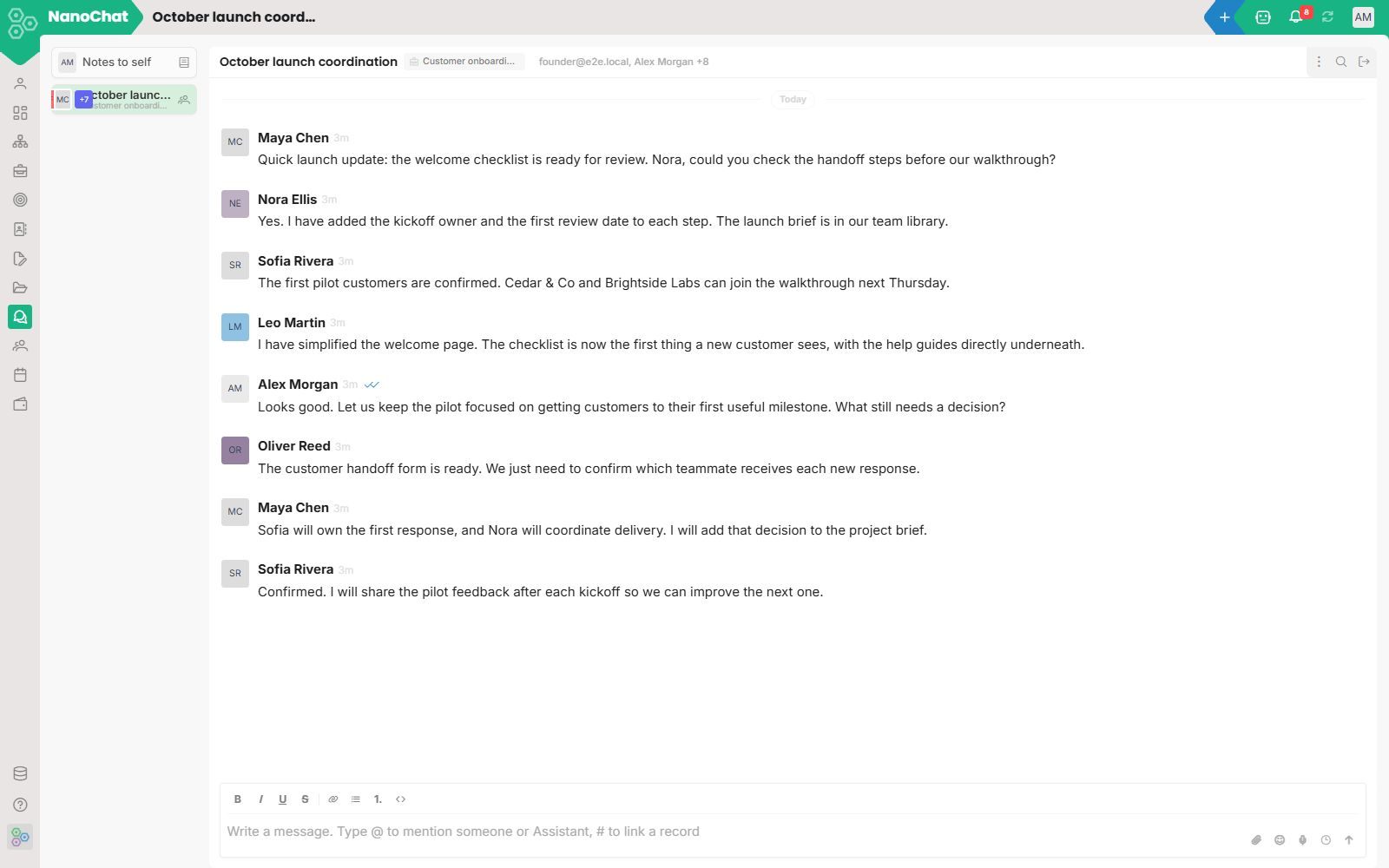
Chat: a topic on the work, not another inbox
Topics stay on the record. People and the Worknano Assistant reply in the same thread, without a separate Slack workspace.
Contact Sales: skip the form, talk to a human
Most sales pages send you to a form, then to an SDR, then to an AE, then to a follow-up, then to a quote. We are a small team and we cut that chain.
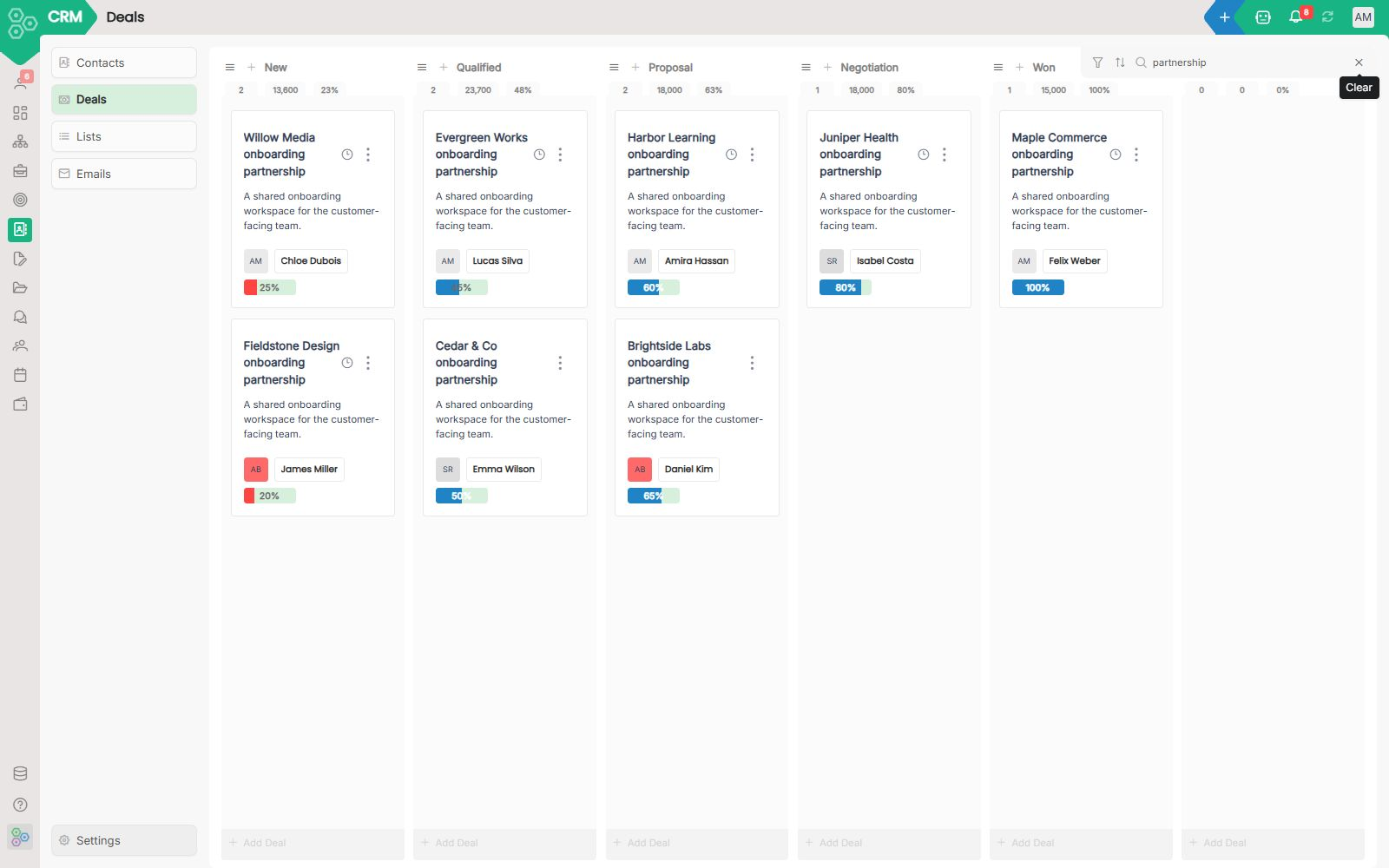
CRM that lives inside your workspace, not on the side of it
Most CRMs treat your sales pipeline like an isolated island. The deal lives there, but proposals are in another tool, invoices in finance, onboarding tasks somewhere else, and customer data gets copied across five different places.
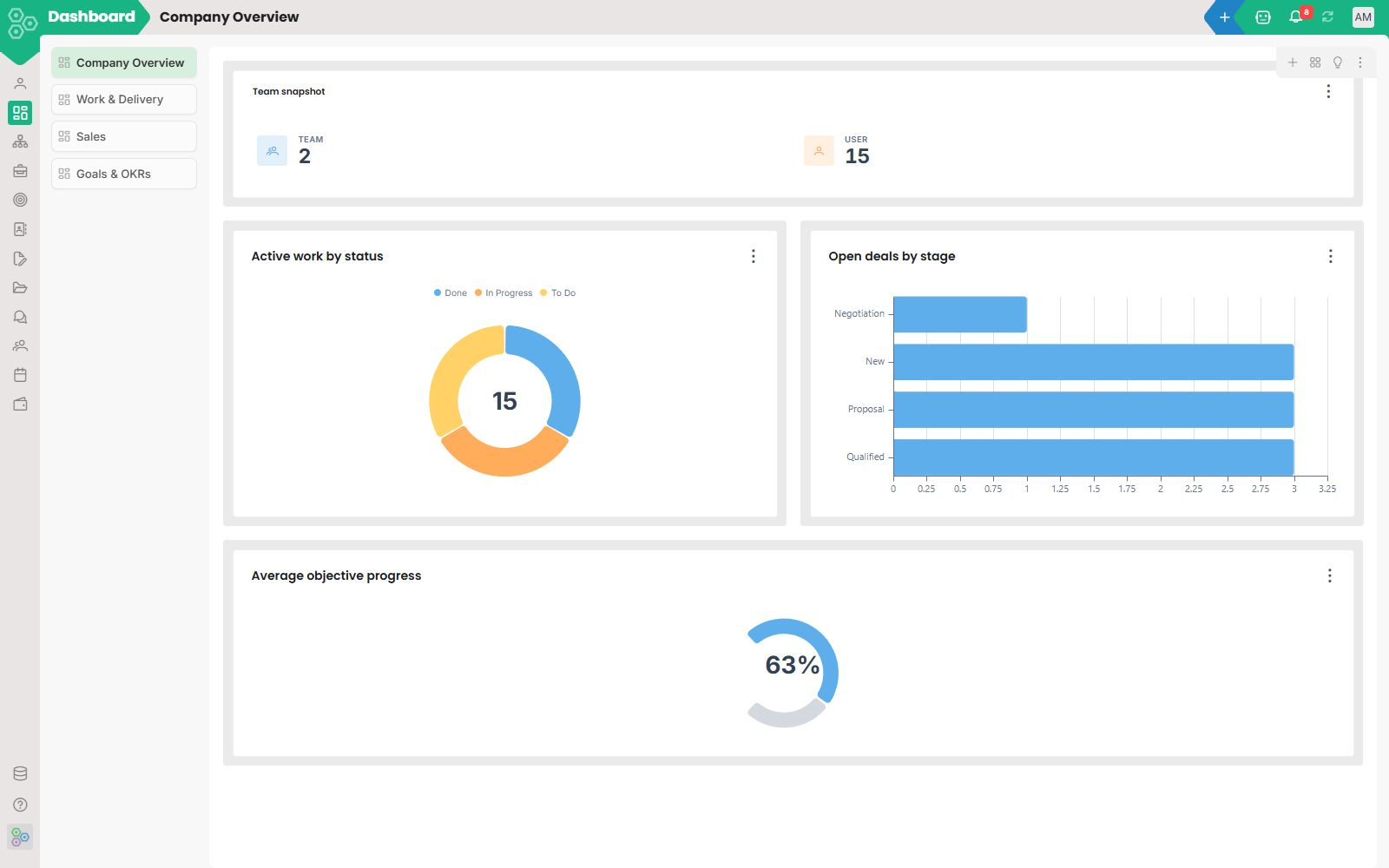
Dashboards that are wired to the actual work
Most dashboards live in a separate tool, refresh on a schedule, and tell you what already happened. Worknano Dashboards are inside the workspace, built from the same data your team works in, so the number you see and the record behind it are one click apart.
Data hygiene: rules that keep important fields filled
Define rules for missing owners, dates and stale updates. Worknano scores your data, shows each person their gaps, sends a daily digest and lets an agent help fix them.
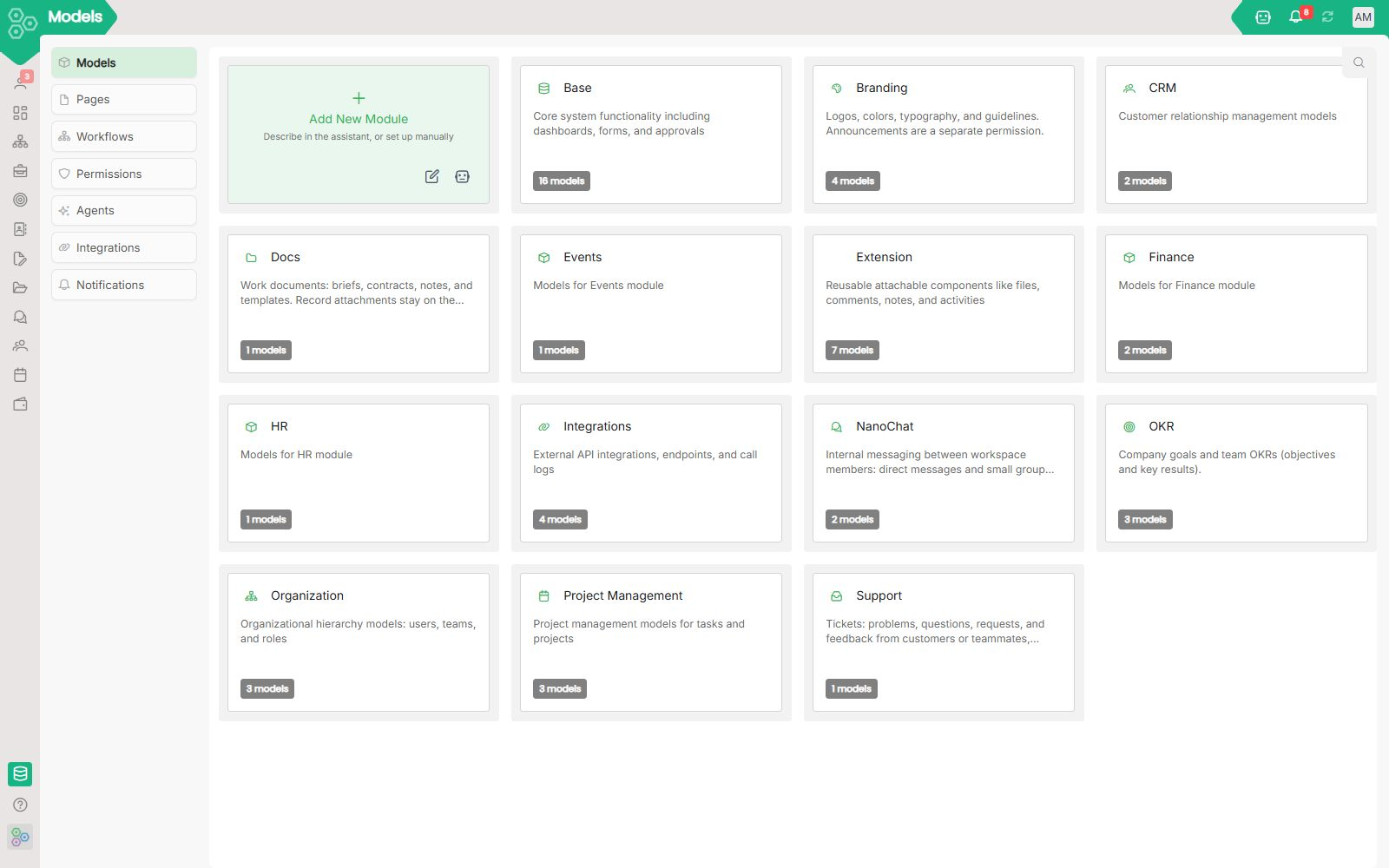
Your data model, visible and editable, no migrations required
Your data should fit your business. Not the other way around. Most SaaS tools give you the columns their engineers decided you need.
How to edit a page assistant and a reusable agent
This lives under Config → Agents. Sparkles opens the page assistant. A reusable agent is prompt, tools, output. You run it from a record, in bulk, or as a workflow step. There is no foreign key to agent. Turn the editor off and shipped agents still run.
How to use the page assistant (sparkles / Ctrl+J)
Sparkles or Ctrl/Cmd+J opens the assistant for the page you are on. Starter cards, the composer, History, and +. Walk me can skip to this drawer. It is not the Agents editor.
How to post an announcement
This lives under Organization. Founders and Directors usually see it. Header + writes a dialog, a Summary notice, or an email / notification. Set audience, theme, and dates. Dialogs can show once or on every login.
How to approve or reject a request
This lives under My. You do not create an approval by hand. Open Approvals, stay on Pending, decide, leave a comment if the form asks. Requests is what you submitted. A secret ask is a common example.
Brand kit: logos, colors, and fonts in the workspace
This lives under Organization. Logos, colors, typography, guidelines, and the email frame. Double-click a swatch, Reset, or From logo. Colors, fonts, and logos stay headings here. They do not get their own URLs.
How to use Chat: messages, replies, reactions, and your switches
Green + starts a direct chat or a small group. @ mentions, # links a record, attach a file. Hover to react, reply, or forward. Settings: left or right, side panel or inline, voice language, and the two chat notices.
Workspace admin: models, pages, and workflows
Config sits at the bottom of the sidebar for people who set up the workspace. Pages and Notifications stay on this screen. Other editors have their own docs. A missing tab means that editor is off. Shipped automations still run.
How to use the sales CRM: company, contact, and deal
Open a company, add a contact, create a deal, drag it to the next stage. Save a list you always look at. Send an email template. That writes the send log. You do not type history by hand.
How to create a KPI dashboard and add a widget
Create a dashboard, set who can open it, add a widget, pick what to count and how to group. Preview on the right. Move and resize, then save. Click a chart slice when it is set up to open that list.
How to call the Worknano API
This lives under Docs, not as a Config tab. One HTTP shape for every module. GET /api/v1/object/{model}/{id} reads one. GET /api/v1/objects/{model} lists. POST, PATCH, and DELETE write. Workflows call this. Store keys in Secrets.
How to share a file and set folder access
Open a folder, add a file or upload, set who can see the folder. Double-click in list to preview. Double-click in icons to edit. Publish one file for a public link. Templates stay internal.
How to create a form: style, logic, assessment, and submissions
New Form or header +. Describe it to the assistant or build it yourself. Set style, labels, logic, scoring, who can see it, captcha, languages, CRM connect. Visitors submit. You read the inbox.
Email signature generator and link templates
This lives under Organization. Templates for QR codes, tracked links, signatures, and files from the person and the brand kit. Header + adds one. The replay icon restores the built-in generators.
How to add an integration endpoint and read the API log
This lives under Config → Integrations. Set path and method on the endpoint. Mapping lives on the workflow step. Inbound webhooks push in. The API log is read-only when a step fails. Keys go in Secrets.
How to edit a model and its fields
This lives under Config → Models. Click a module card, open a record type, prefer an existing field. Connectable plus Connect on the record binds a live count. Connected Fields only lists those binds.
How to add a page with the assistant or by hand
This lives under Config → Pages. Add New Page, sparkles on that card, or header + opens the assistant so you describe the screen. The pen sets name, label, icon, layout, and sections by hand. A yellow DRAFT badge stays until you save all changes.
How to use My: your work, approvals, and profile
Open My from the left sidebar. Jump from Summary into a record, ask My Agent, approve something, add a task on your board, and request a company secret.
How to read the bell and edit notification templates
Click the header bell. A row opens its path and marks read. You cannot invent rows. Admins edit templates under Config → Notifications: {field}, {fk.field}, to_paths, email or chat. A workflow NOTIFY writes them.
How to update an OKR: period, objective, and key result
Change year and quarter, add an objective, nest a key result, type the current value. Progress is a number. You do not drag this on a board. Filter by owner. Your RACI rows also sit under My.
Org chart: who reports to whom
This lives under Organization. Click Org chart in the left sidebar. Click a person or a team to open details. It is a picture of Users and Teams, not a slide you export once and forget.
Organization: directory, org chart, and brand studio
Organization is the company directory and brand studio. The left sidebar switches sections. There is no top tab bar. Invite people, set teams, then open Secrets, the org chart, generators, announcements, or the brand kit.
How to set who can read, create, or approve a record
This lives under Config → Permissions. Open a record type and set which roles can read, create, update, delete, or approve. Access levels sit on the person and can unlock a module. You assign the role on the user in Organization.
How to set your profile, public card, and meeting hours
This lives under My → Profile. Hover the avatar, open View Card, toggle phone and email, set calendar hours, then Add to phone. That is your identity, not Organization → Users.
How to run a kanban board: tasks, ideas, and tickets
Pick a project, add a task at the bottom of a column, drag it when status changes, open the card to set a date. Use List for Backlog, Timeline for dates, Ideas then a task, project chat.
How to add a shared secret and request access
Open Organization → Secrets. Header + adds a company login. Mark it Requestable so someone can ask from My → Secrets. You approve on My → Approvals. Personal logins stay on My → Secrets.
How to run the ticket inbox on a project
This lives under Projects → Tickets. If Support is off, the tab hides. Quick-add a title, set type, priority, channel, and requester. Escalate to a task or an idea. Resolve when done. Do not reuse a task for intake.
How to add a workflow: manual, scheduled, or auto
This lives under Config → Workflows. Daily work is the ⋮ menu on a record. Admins add Manual, Scheduled, or Auto here. Connected Fields is a fourth tab, not a class. A step can set, notify, call, approve, or run an agent.
Worknano docs: how to use the workspace
How-to pages for My, Projects, CRM, OKRs, Organization, Config, and the API. Each page says what to click and what happens next.
DTC Fashion Brand: Reducing Fulfillment Errors by 70%
"Our mix of Shopify, Airtable, and WhatsApp was constant chaos, leading to a 12% error rate.
E-commerce Ops: Syncing Marketing and Logistics
"Our Shopify store, email marketing, and logistics tools never talked to each other. Nobody had a unified view of the customer.", Sofia Rossi, Head of Ops, Verde & Co (Milan, €4.2M revenue) The Problem: Slow handoffs between the marketing and logistics teams were creating a poor experience for their customers.
Enterprise: a dedicated instance with sub-tenants
Run Worknano on a dedicated instance and give each company in your organization its own isolated sub-tenant, with its own users, data, brand and domain.
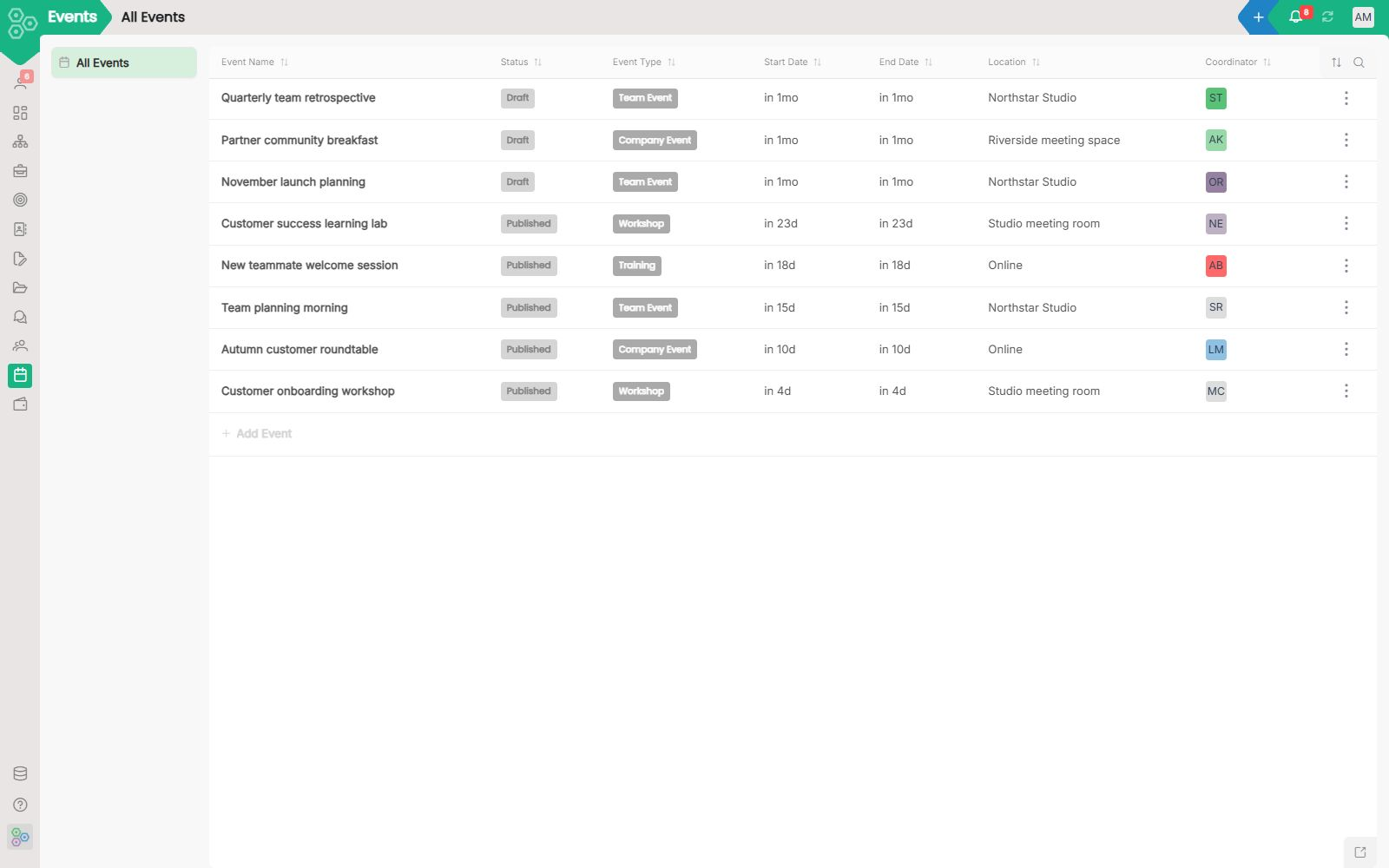
Events and stuff scheduler from registration to follow-up, in one workspace
Running an event today usually means a registration tool, an email tool, a check-in app, a survey tool, a payment processor and a spreadsheet to glue them together. Worknano Events ships every step in one workspace, so the attendee record is the same record from registration to follow-up email three weeks later.
What if I need a module Worknano doesn't ship?
Describe it in plain English. The AI Module Builder generates the data model, input form, workflow, and report inside the same auth and database.
Which AI model does the AI Module Builder use?
Flexible LLM configuration. You can connect any model you choose, including local deployments, open-source models, or your company's own private endpoint. You're never locked into a single provider.
What happens to our data if we cancel?
Your data belongs entirely to you. Every list view exports to Excel, CSV, or PDF.
Where is our data stored, and is it secure?
You choose regional hosting in the EU, the USA or APAC, and your workspace data and AI processing stay in that region. All data is encrypted at rest (AES-256) and in transit (TLS 1.3).
Is Worknano GDPR compliant?
Yes. Data is stored in the EU (Frankfurt) by default, each tenant's database is fully isolated, and we sign a Data Processing Agreement on request.
Can I migrate existing data?
Yes. CSV and Excel imports are supported out of the box and map directly into CRM, Projects, and HR with auto-suggested field mapping.
How granular are permissions?
Permissions are scoped at every level: role, module, model, field, and record. You can invite a freelancer or advisor to see one specific project board without exposing your financial metrics or internal discussions.
How does pricing work while you're in early access?
Worknano is priced per company, never per user, so adding teammates never changes your bill. Right now we're in early access, which means it's free for early-stage startups, and founding members who join now lock in perks as we grow.
Can we self-host or get a dedicated instance?
Yes. A dedicated single-tenant instance or an on-premise deployment on your own infrastructure is available on our Enterprise plan.
Can an enterprise run several companies in Worknano?
Yes. On the Enterprise plan, Worknano runs on a dedicated instance for your organization, and each of your companies gets its own sub-tenant with its own users, data, brand and domain, fully isolated from the others.
How is Worknano different from popular SaaS tools and vibe-coded apps?
Popular SaaS tools work in isolation. Each has its own database, its own auth, and no awareness of your other tools, so data silos pile up fast.
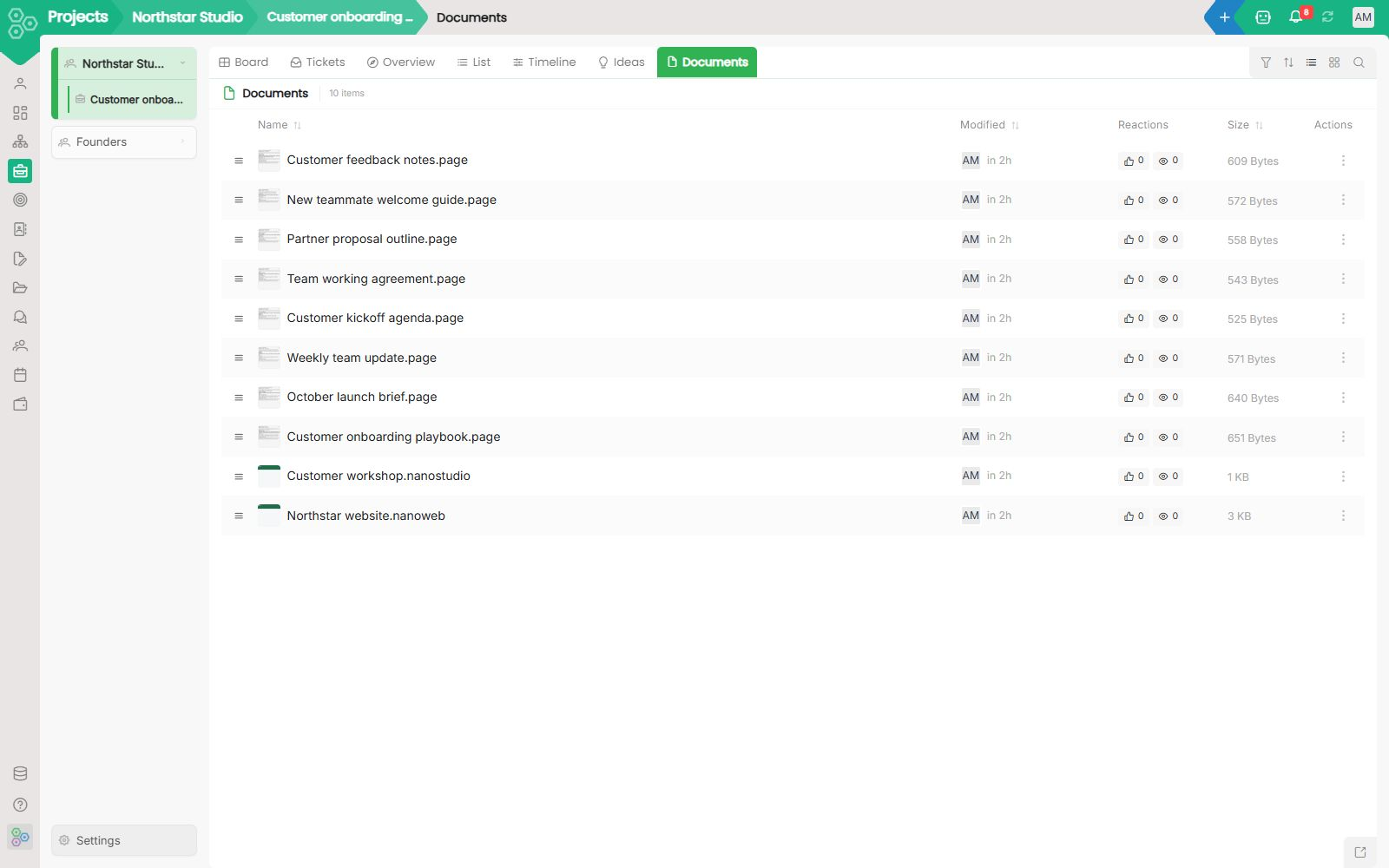
Files: edit documents, spreadsheets, images and media in your workspace
Edit Word, Excel, PowerPoint, PDF, images, drawings and media projects in one workspace. Coordinate edits with phase-one co-editing, and ask AI agents to create files or propose changes.
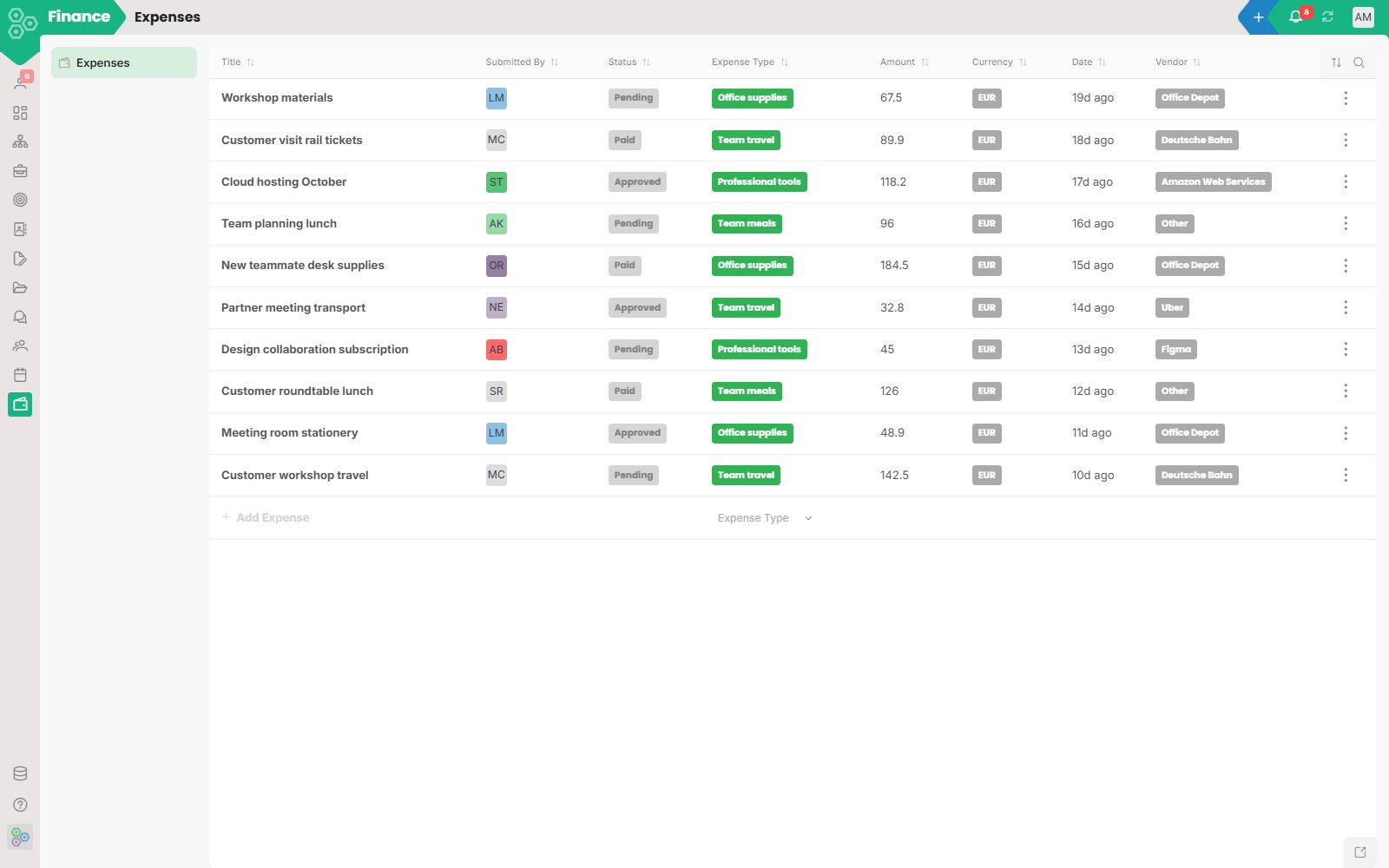
Your finance stack shouldn't require a finance team.
Worknano Expenses is where receipts get logged, invoices go out, and nothing falls through the cracks, without needing a bookkeeper to hold it together. Receipts that read themselves No more chasing the team for receipts at month-end.
Run the whole startup before you can afford a COO.
You're 4 people. You ship something every week. Your stack already costs €600/month and nothing talks to anything. We've been there.
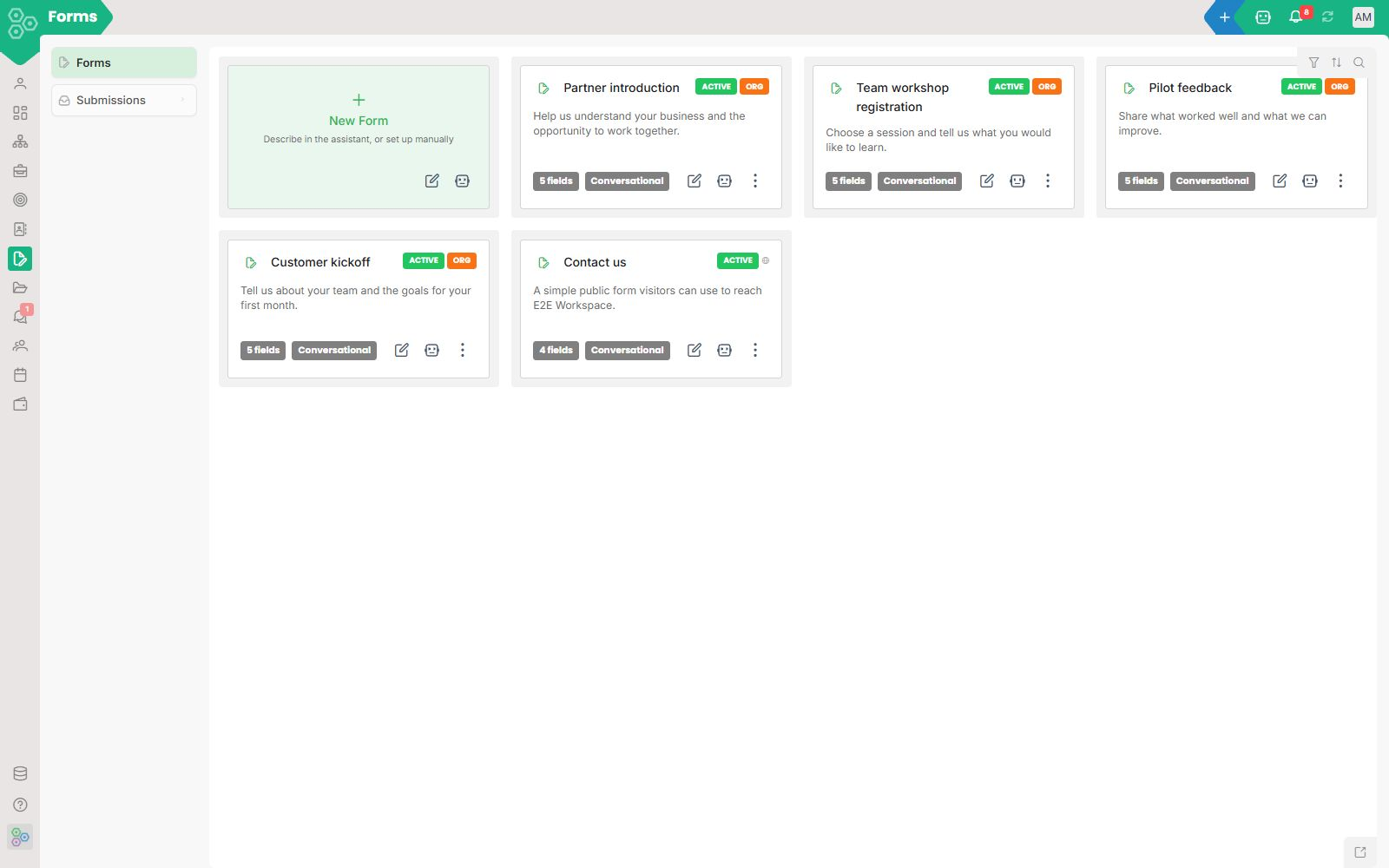
Forms that are also a CRM, also a database, also a workflow
Forms that are also a CRM, also a database, also a workflow Most form tools are just simple inboxes with a pretty interface on top. You build a form, embed it on your website, and then the responses just pile up in a cold list that you have to constantly monitor.
How a French scale-up cut SaaS spend by 60%
"We were juggling 12 different tools, none of which talked to each other.
How is Worknano different from popular SaaS tools and vibe-coded apps?
Popular SaaS tools work in isolation. Each has its own database, its own auth, and no awareness of your other tools, so data silos pile up fast.
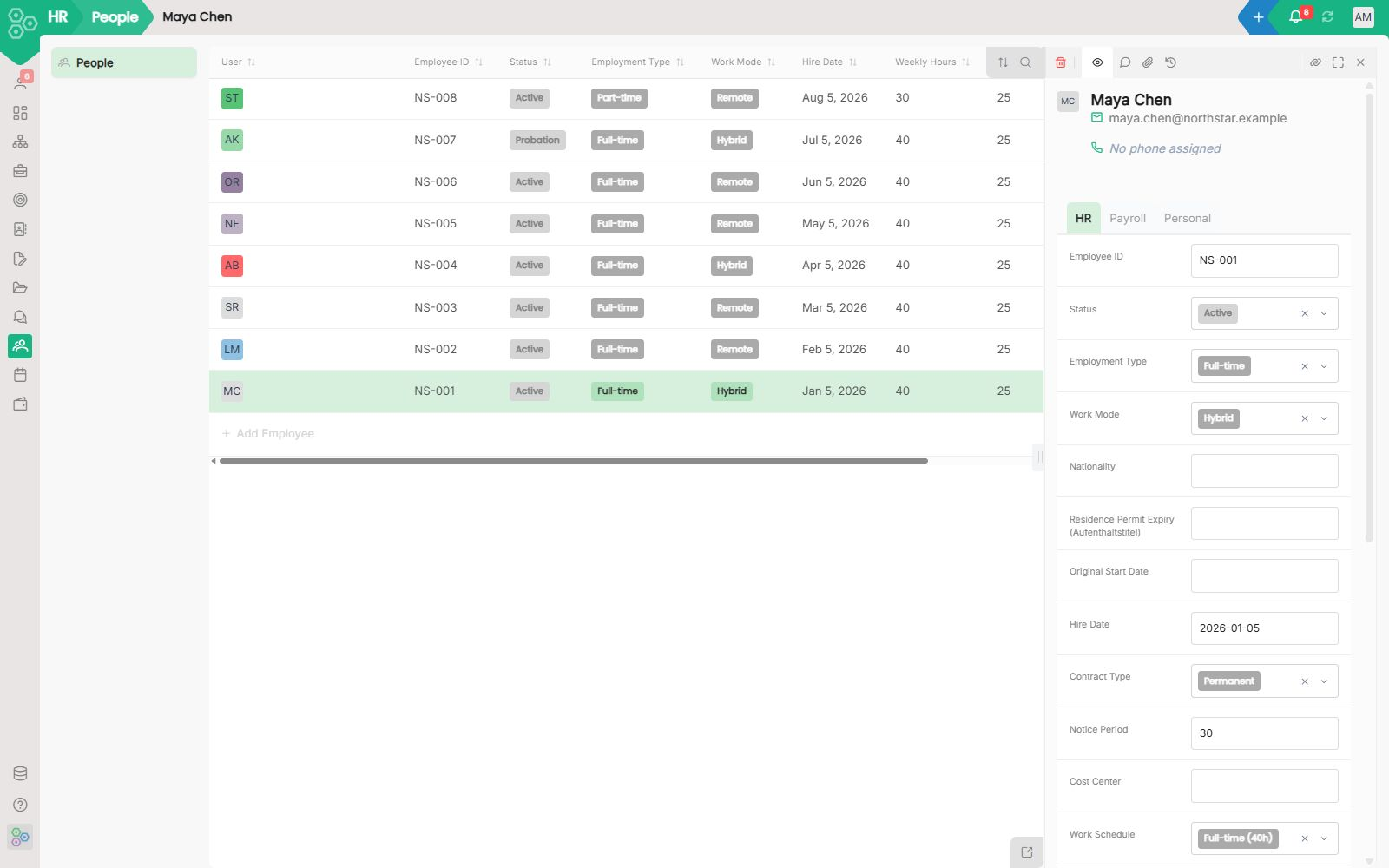
HR for teams that want to ship, not paperwork
HR for teams that want to ship, not paperwork Most HR tools force you into rigid templates and limited fields. Worknano gives you a complete, flexible HR system that adapts to how your company actually works, right from day one.
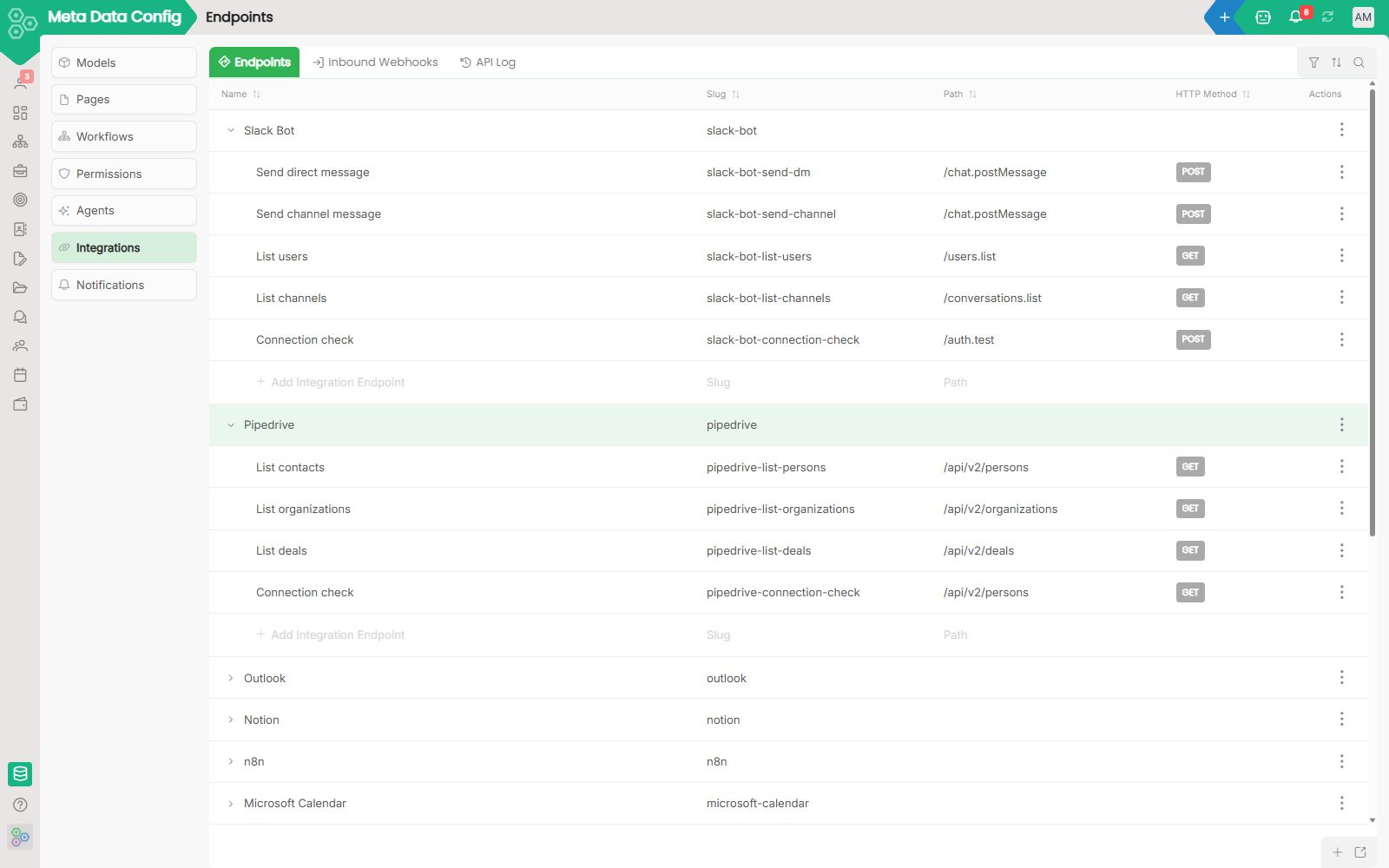
Integrations: connect your stack in clicks, not tickets
Integration is where SaaS dreams go to die. The vendor's marketplace lists your tool, you click connect, you wait three minutes, and either nothing happens or it only works for the one trivial case the demo covered.
Worknano for investors: A different approach to vibe coding
Paying customers, more than a year of use with pilot customers, and a multilingual business platform companies can adapt with AI.
Is Worknano GDPR compliant?
Yes. Data is stored in the EU (Frankfurt) by default, each tenant's database is fully isolated, and we sign a Data Processing Agreement on request.
Launch in a weekend: a working business in 48 hours
Most new businesses waste their first month evaluating tools and their second month trying to make them all talk to each other. By month three they finally have a stack but still no customers.
Look legit on day one: a brand-aware workspace before your first sale
Looking professional in your first year used to be exhausting. You needed a designer, a brand book, a website agency, separate invoicing templates, email signature tools, and the discipline to keep everything perfectly in sync.
Manufacturing SME: Gaining Production Visibility
"Excel hell and an expensive, rigid ERP left us blind to bottlenecks.
Marketing Agency: Client Portals That Finally Impress
"Clients used to ping us daily for status updates, and onboarding new hires took two full weeks.
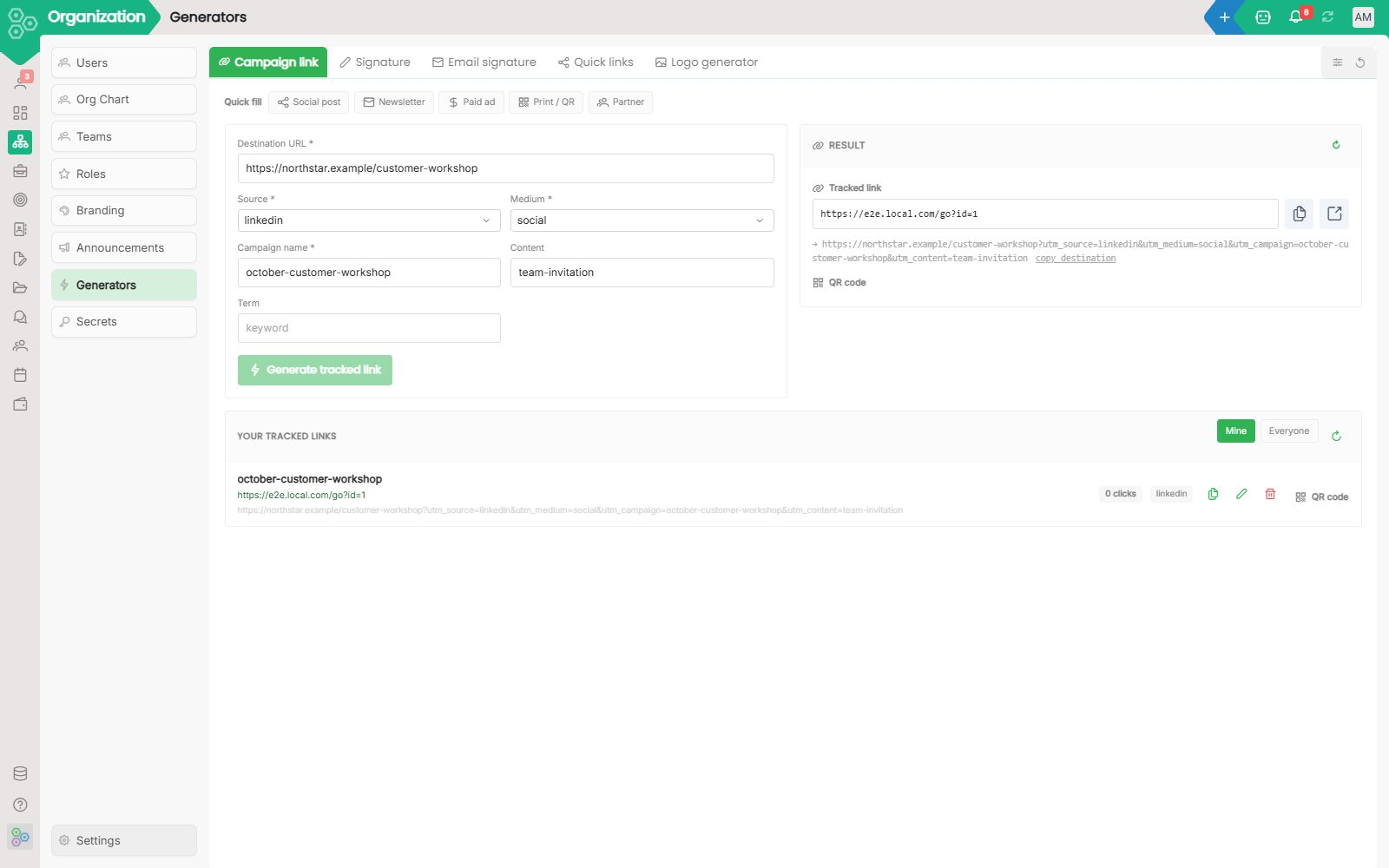
Mini Tools: Small helpers that make everyday work easier.
Some tasks are too small for a full app but too common to keep doing manually. Worknano brings handy mini tools directly where you need them, inside Branding, CRM deals, documents, or anywhere else in your workspace.
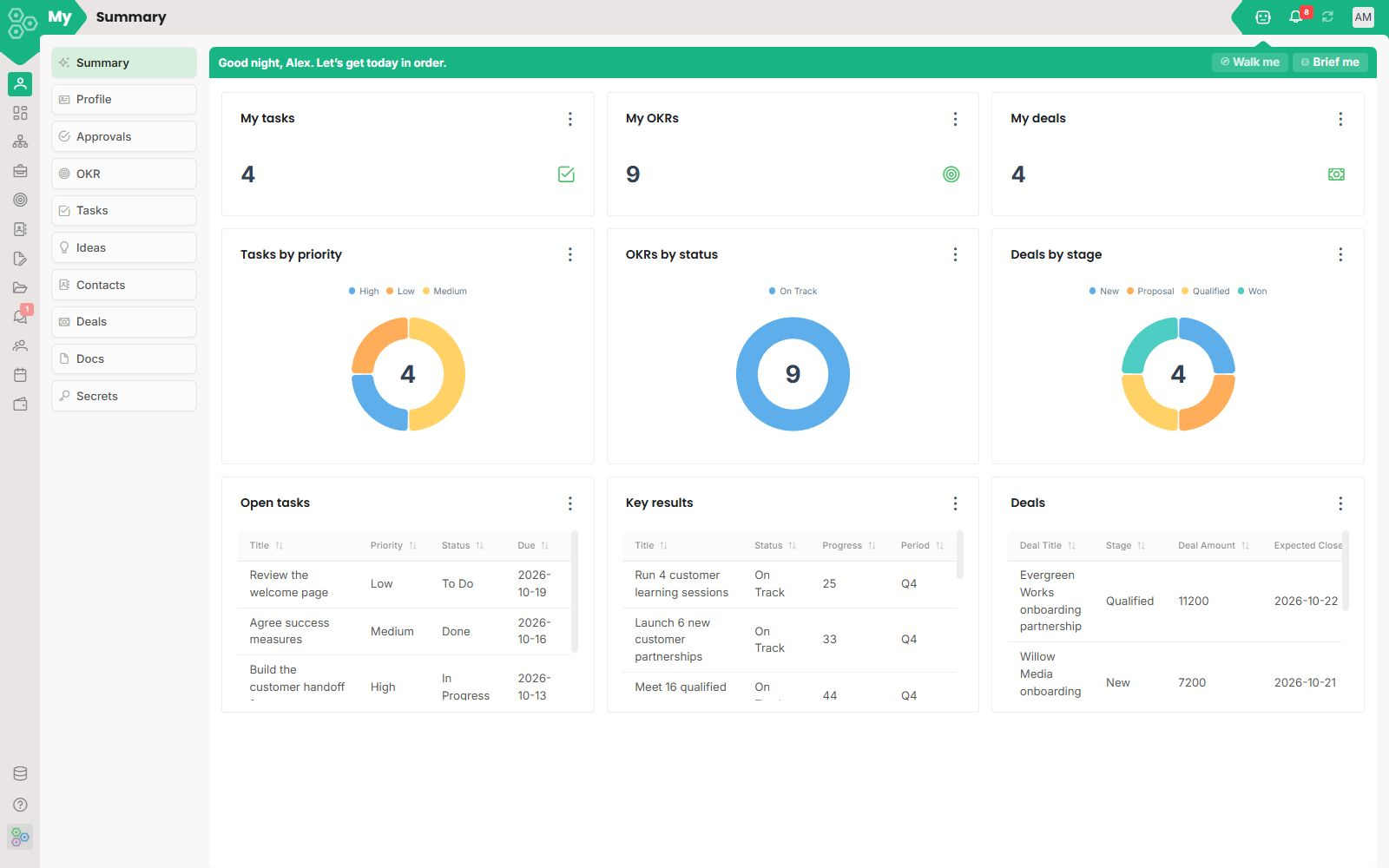
My workspace: today's priorities, surfaced from every module
Every modular SaaS has the same problem: the more modules a user has, the more places they have to check first thing in the morning. Worknano solves it with a personal home called 'My' that aggregates the work waiting for you across every module.
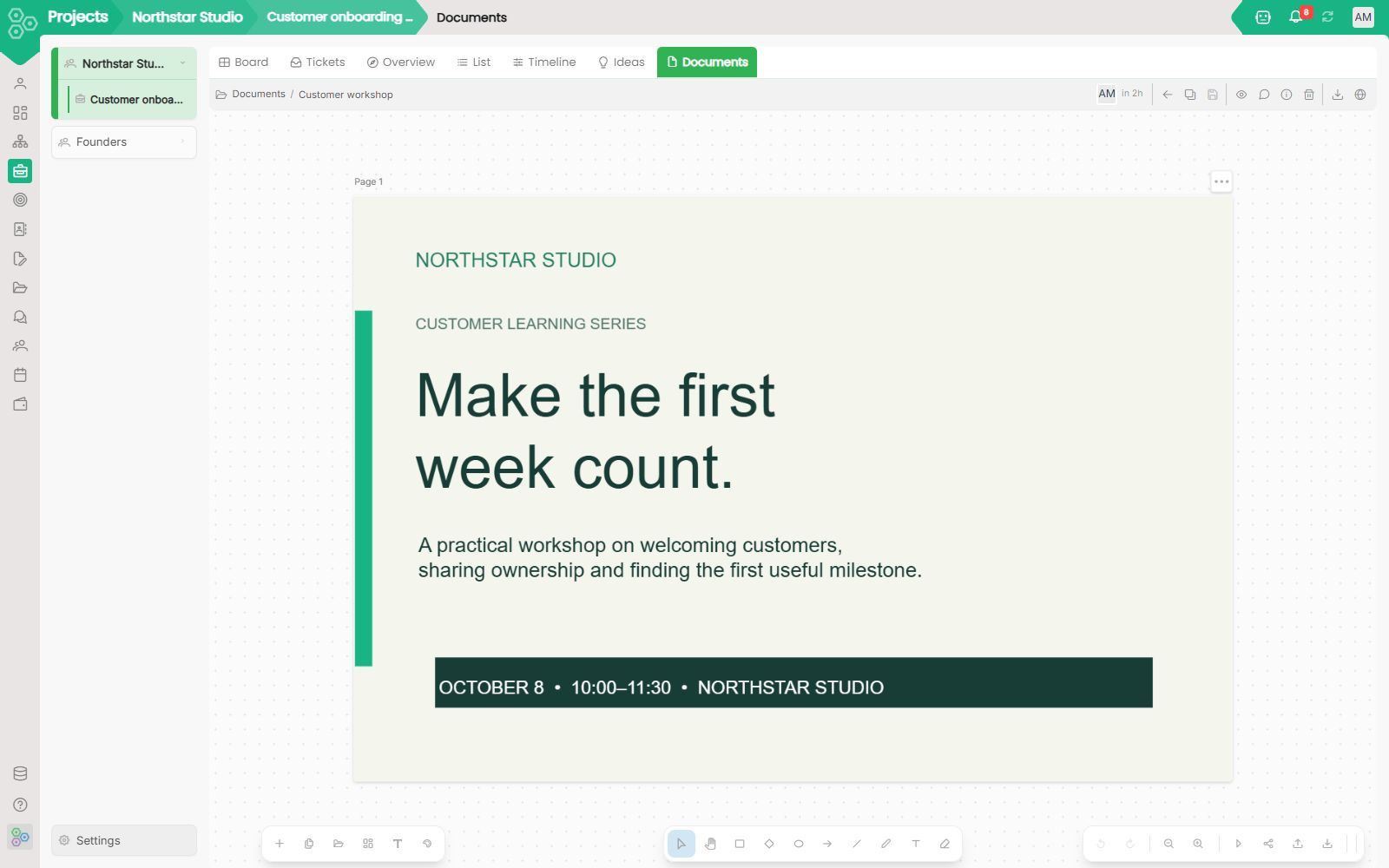
Design: the creative space for teams
The website builder handles your public site. Design handles images, decks, and boards in the same workspace.
NGO: Donor Management That Builds Lasting Trust
"Our funding data was scattered across inboxes and spreadsheets, which created a high audit risk and endless administrative work.", Dr.
OKRs without the religion: a calmer way to run quarterly goals
Most teams that adopt OKRs end up with a beautifully formatted spreadsheet, a quarterly off-site to write it, and a Friday afternoon four weeks later when nobody has touched it. The framework is not the problem; the religion is.
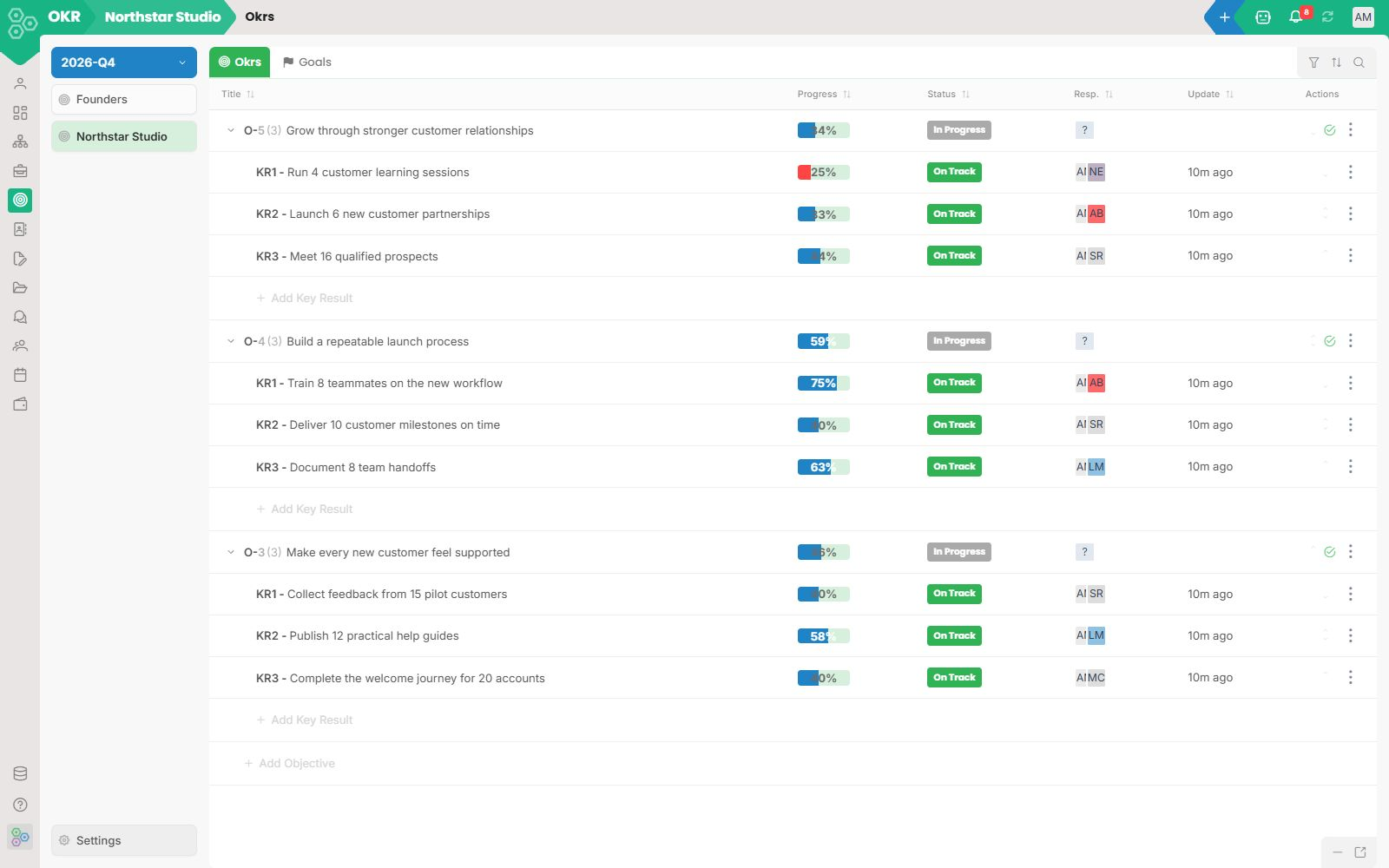
OKRs: Connected to real work, not hidden in spreadsheets
Most OKR tools fail because they are disconnected from the work. The team types the objective in January, types the progress in March, and never types again.
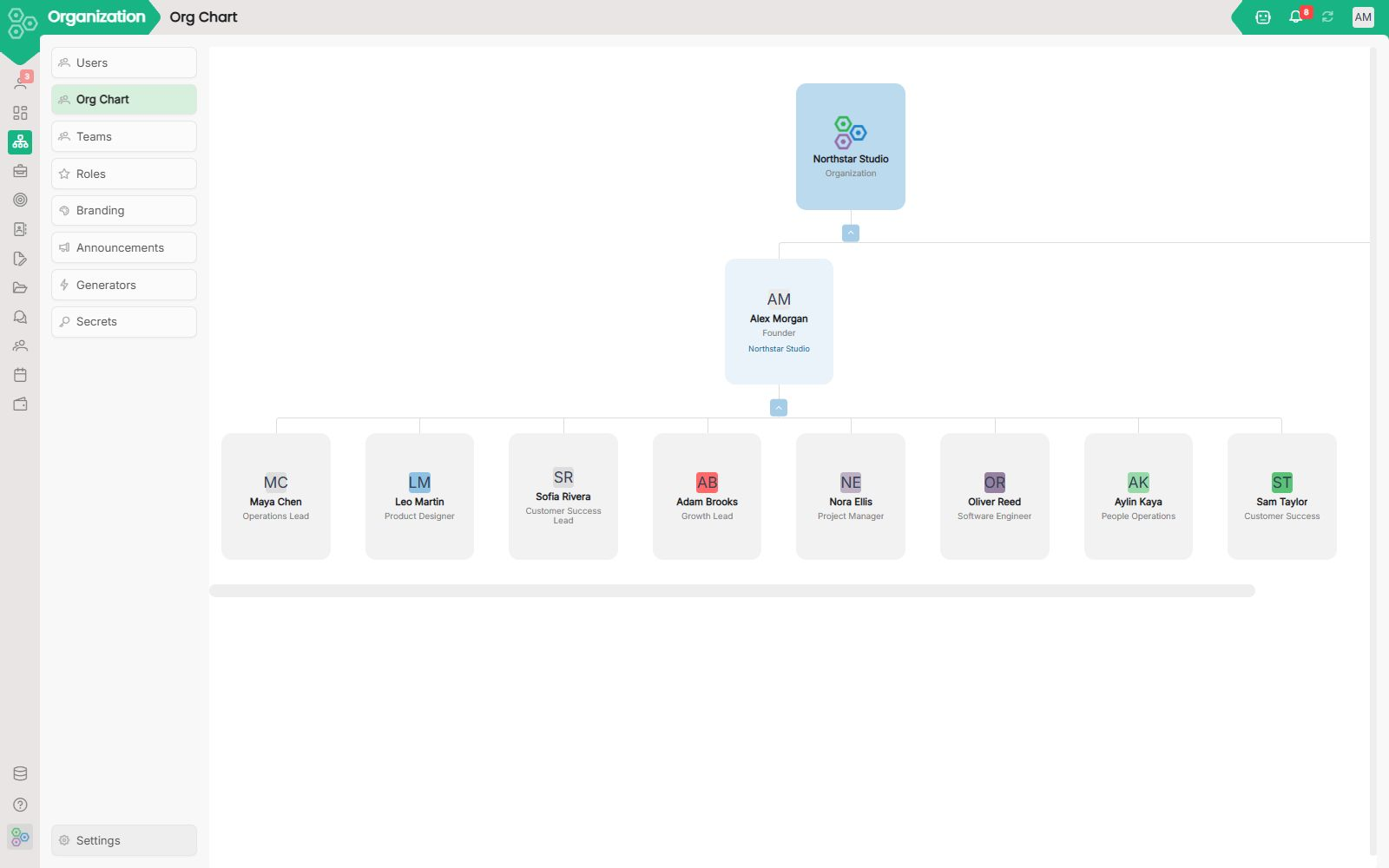
Organization: divisions, teams, users, all in one map
Most SaaS forces you to redefine your organisation in every product: who is on which team, who reports to whom, what each role can see. Worknano centralises the org structure so every other module derives permissions, approvals and reporting from one source.
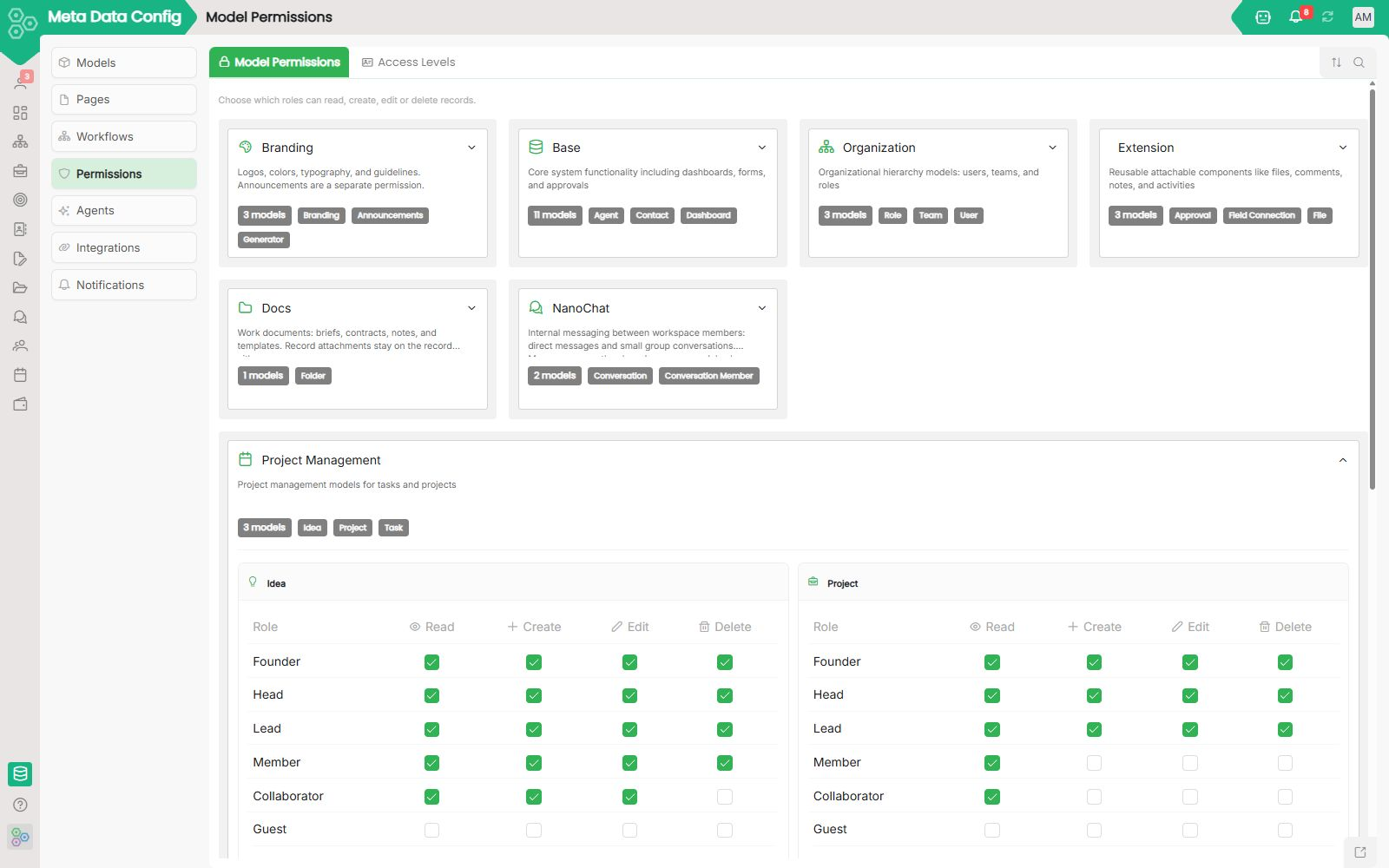
Permissions: roles, access, and who can see what
Permissions: Roles, access, and who can see what Most teams manage permissions separately in every tool, one matrix in the CRM, another in finance, a third in file sharing. Worknano centralizes access control in one place.
Process Mining: See how work actually flows in your workspace.
Every team has a written process and a real process. The written one lives in a slide deck.
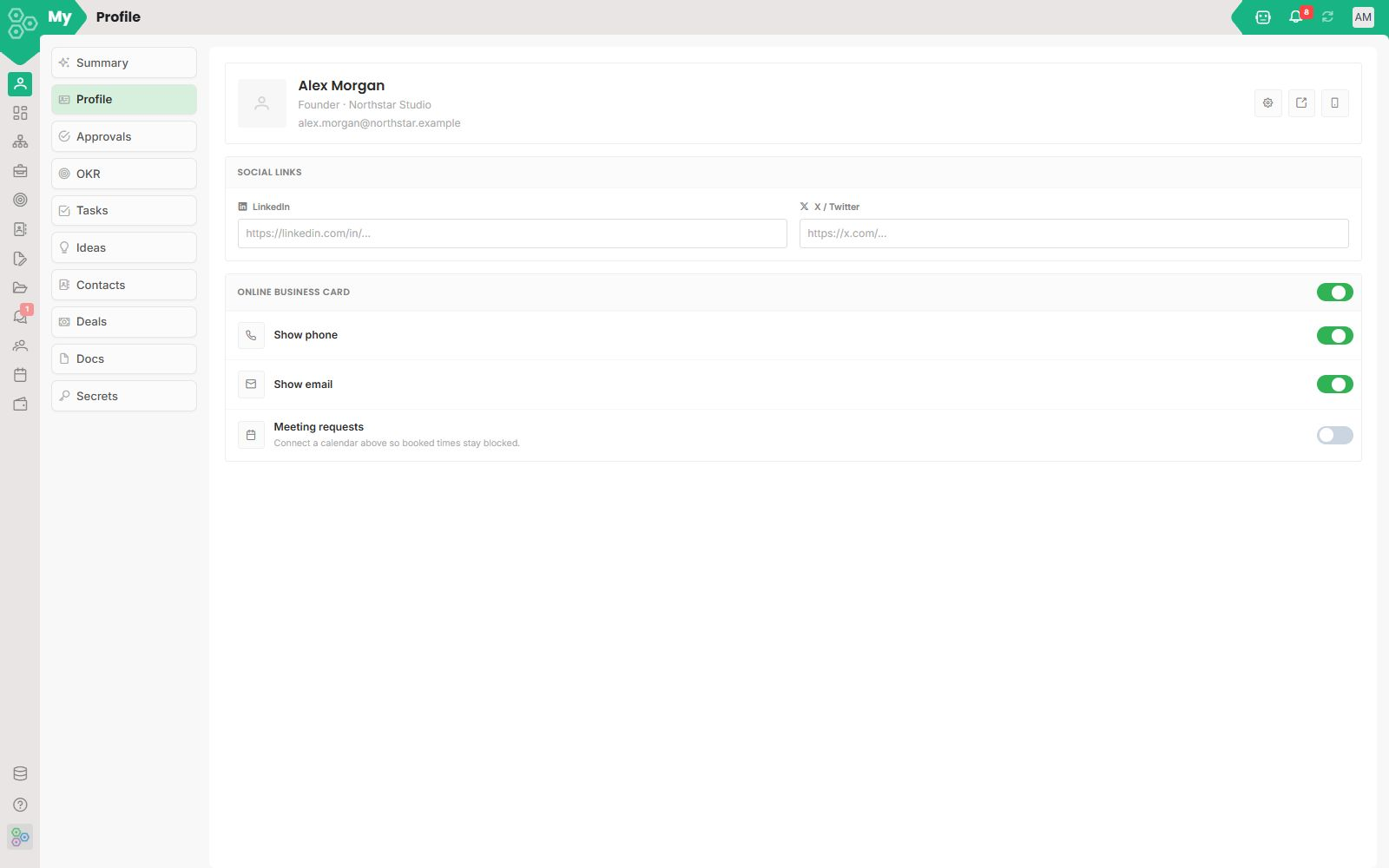
Profile: a public page, a digital business card, a booking link, all in one
A profile used to be a row in a directory. In Worknano, your profile is a public page you can hand out at a conference, install on a phone like a native app, and use as the booking link your customers schedule against.
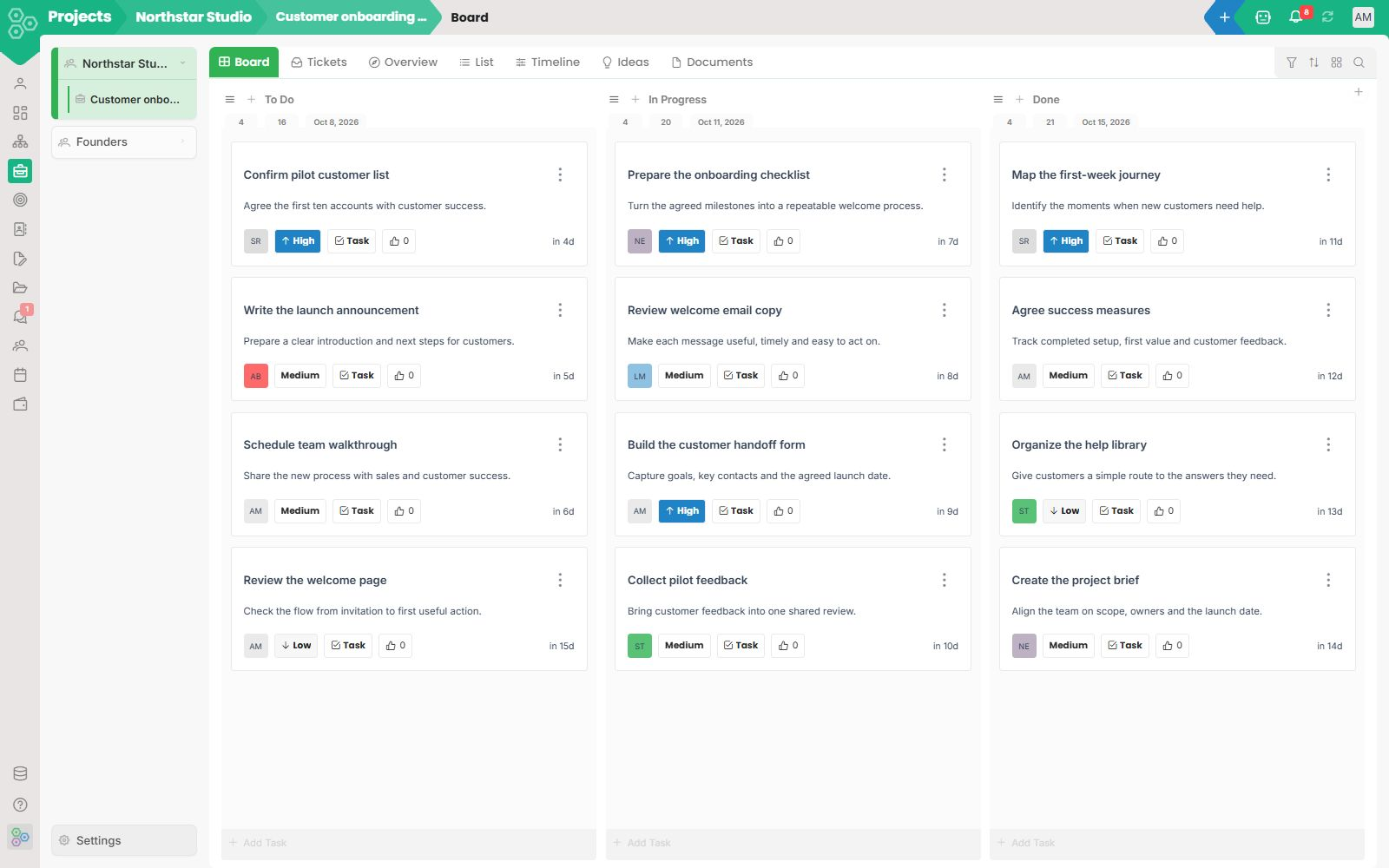
Projects that ship, not project tools that demo well
There is a category of project tool that looks beautiful in a screenshot and turns into a graveyard by week six. The reason is always the same: the team has to type the plan into the tool, then type the plan into a status doc, then type it again into the weekly review.
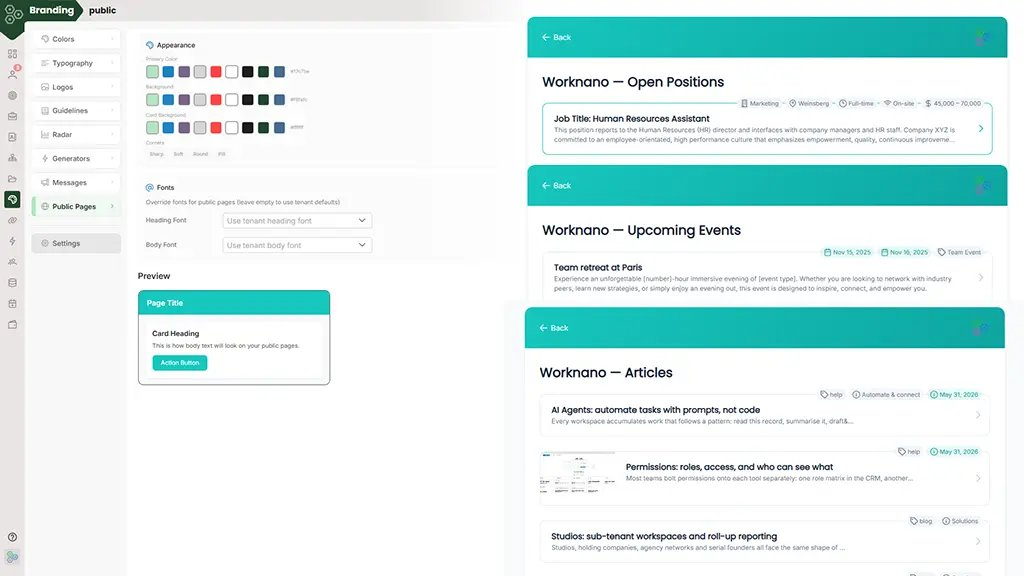
Public Pages let you safely share your data with the world.
Public Pages let you safely share your data with the world. Want to publish open job positions, upcoming events, blog articles, a knowledge base, team profiles or even selected CRM records?
Ditch the bloated stack. Cancel the extras, keep one powerful workspace.
Open your company credit card statement and count the SaaS charges. Most small teams we work with are juggling tons of different tools.
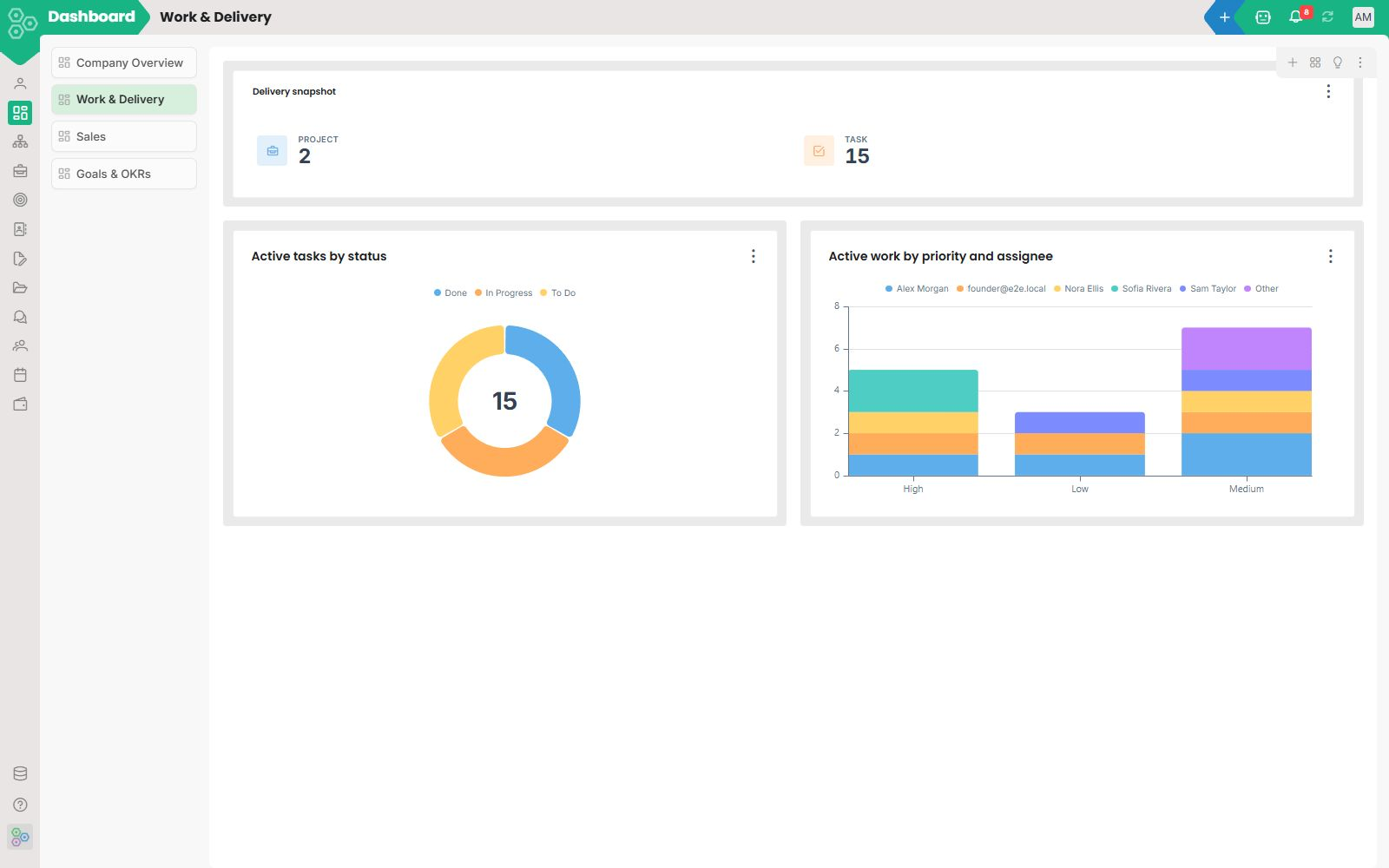
Reporting that answers the questions your teams actually ask
Worknano reporting is not a fixed set of charts, it is a workspace-native analytics layer you configure once and reuse everywhere. In the report designer, you choose the exact fields, filters, groupings and visualizations you want, then save that view as a dashboard, a report, or a shared insight.
Roadmap: what's shipping next, in plain English
October 2026 Files, chat, agents, MCP and semantic search Files, workspace chat, an MCP bridge, and stronger AI agents added. Semantic search finds content by meaning across all your files, at no extra cost.
Scale without rewiring: add modules as you grow, never re-platform
Scaling a small business or startup is hard enough. The last thing you need is another painful migration when you outgrow a tool.
Secrets: a team password vault that stays in your workspace
Shared logins should not live in Slack threads or sticky notes. Worknano Secrets is a team password vault with access requests, role-based visibility, and an audit trail.
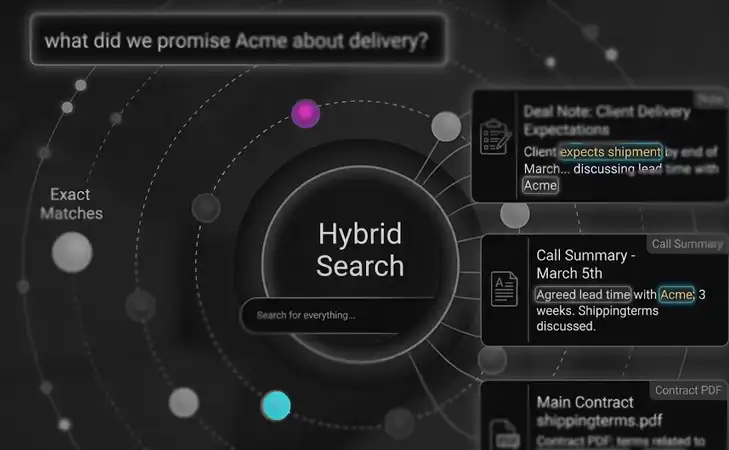
Semantic search: ask your workspace in your own words
Most search boxes match words. If you don't remember how something was phrased, you don't find it.
How a Series-A SaaS replaced 8 SaaS tools in one week
"The fragmentation was killing our momentum.
Small business HQ: sales, ops, finance and people, under one roof
Small businesses rarely have a CIO to negotiate with vendors, a procurement team to consolidate licenses, or a technical team to wire everything together. The owner ends up doing it all themselves, usually between sales calls and while putting out daily fires.
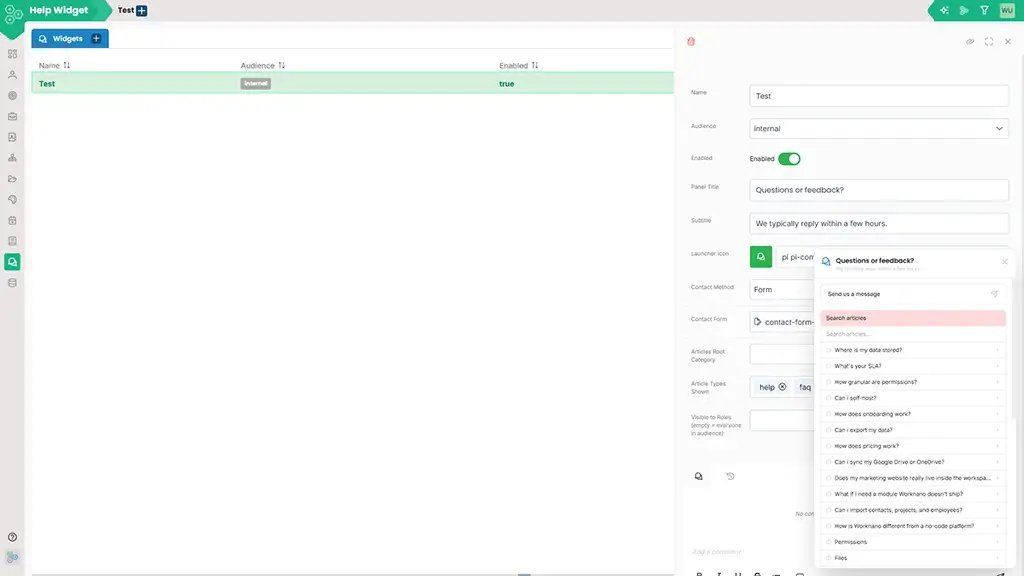
Your help center, blog and FAQ: same module, same workflow
Most companies end up with a help center on one platform, a blog on another, a knowledge base on a third, and a product-tours tool on a fourth. Each has its own login, editor, search index and analytics.
Templates: clone a working playbook instead of starting from scratch
Starting from a blank workspace is fine if you have weeks to spare. Most teams do not.
Worknano vs. Asana: Why Structured Databases Beat Disconnected Task Lists
Worknano vs. Asana: Why Structured Databases Beat Disconnected Task Lists If you are looking for a simple place to type out a basic task list, draw a generic kanban board, and assign a due date to a teammate, Asana is great.
Worknano vs. HubSpot: Stop Paying the "Contact Tax" for Features You Don't Use
If you are a heavily funded B2B enterprise with a massive marketing department dedicated to complex multi-path lead attribution, HubSpot is an exceptionally polished platform. It has spent years building a reputation as the friendly, low-code alternative to legacy corporate CRMs.
Worknano vs. Jira: Reclaim High-Speed Execution Without the Enterprise Bloat
For over a decade, Jira has been the default command center for traditional software engineering. If you are managing thousands of legacy code deployments and have a dedicated team of full-time Atlassian administrators to maintain your instances, Jira’s heavy, rigid framework serves its purpose.
Worknano vs. Monday.com: Stop Paying the "Integration Tax" for Lagging Boards
Monday.com is famous for its vibrant color palettes and visual flair. If your goal is to build a basic dashboard to manually track a handful of isolated team tasks, it is a highly capable tool.
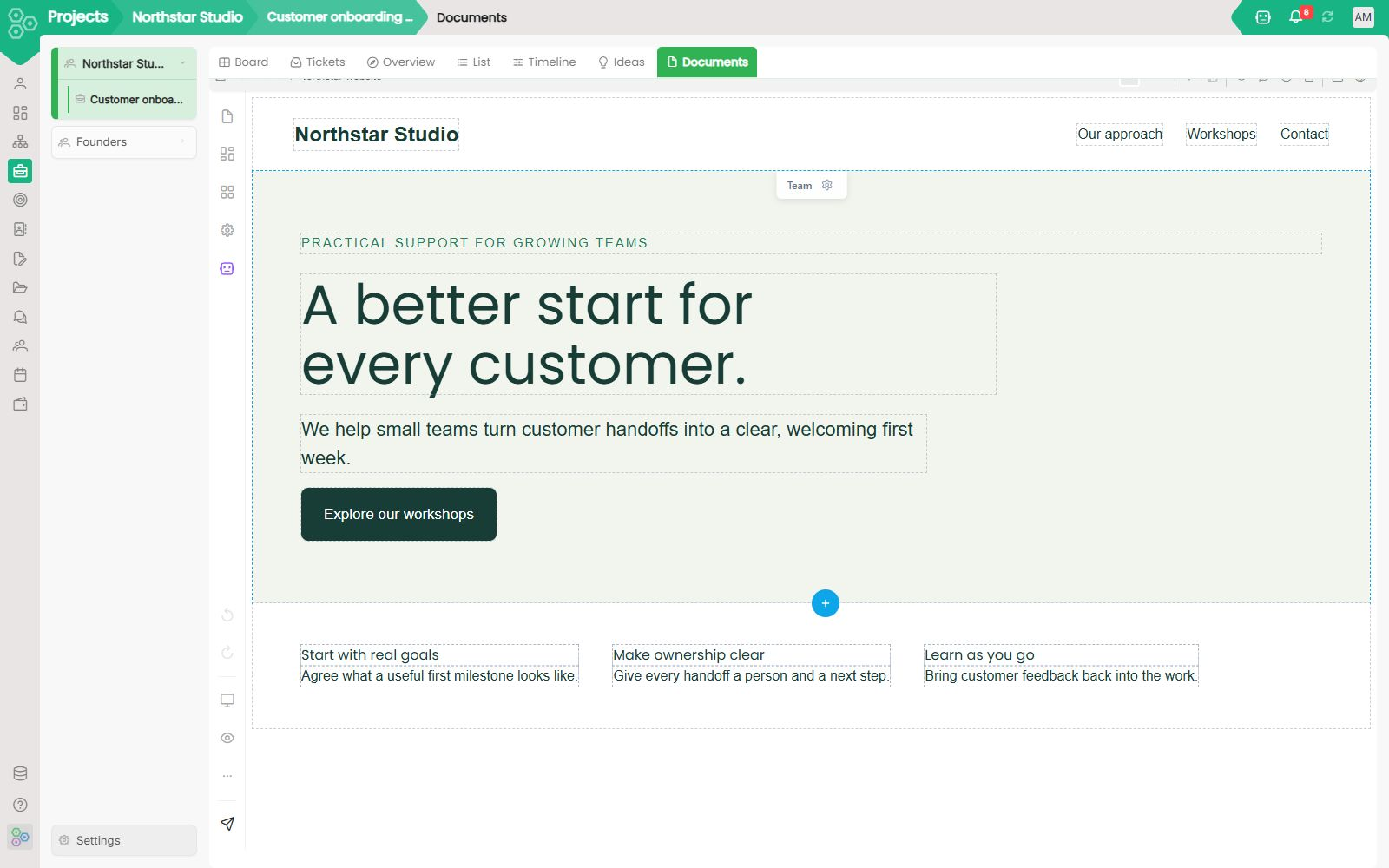
Website Builder: Ship a real marketing site from your workspace
If your marketing site, your help center, your blog, and your gated portal each live on a different platform, you pay four bills, manage four logins, and copy your brand kit into four places that drift.
What happens to our data if we cancel?
Your data belongs entirely to you. Every list view exports to Excel, CSV, or PDF.
What if I need a module Worknano doesn't ship?
Describe it in plain English. The AI Module Builder generates the data model, input form, workflow, and report inside the same auth and database.

What is Worknano? A different approach to vibe coding
Connected tools for your everyday work. Use AI to adapt them to your business, while we take care of the platform underneath.
Where is our data stored, and is it secure?
EU (Frankfurt) by default; US East and APAC are available on Enterprise. All data is encrypted at rest (AES-256) and in transit (TLS 1.3). Each tenant's database is fully isolated, your data never mixes with another company's.
Which AI model does the AI Module Builder use?
Flexible LLM configuration. You can connect any model you choose, including local deployments, open-source models, or your company's own private endpoint. You're never locked into a single provider.
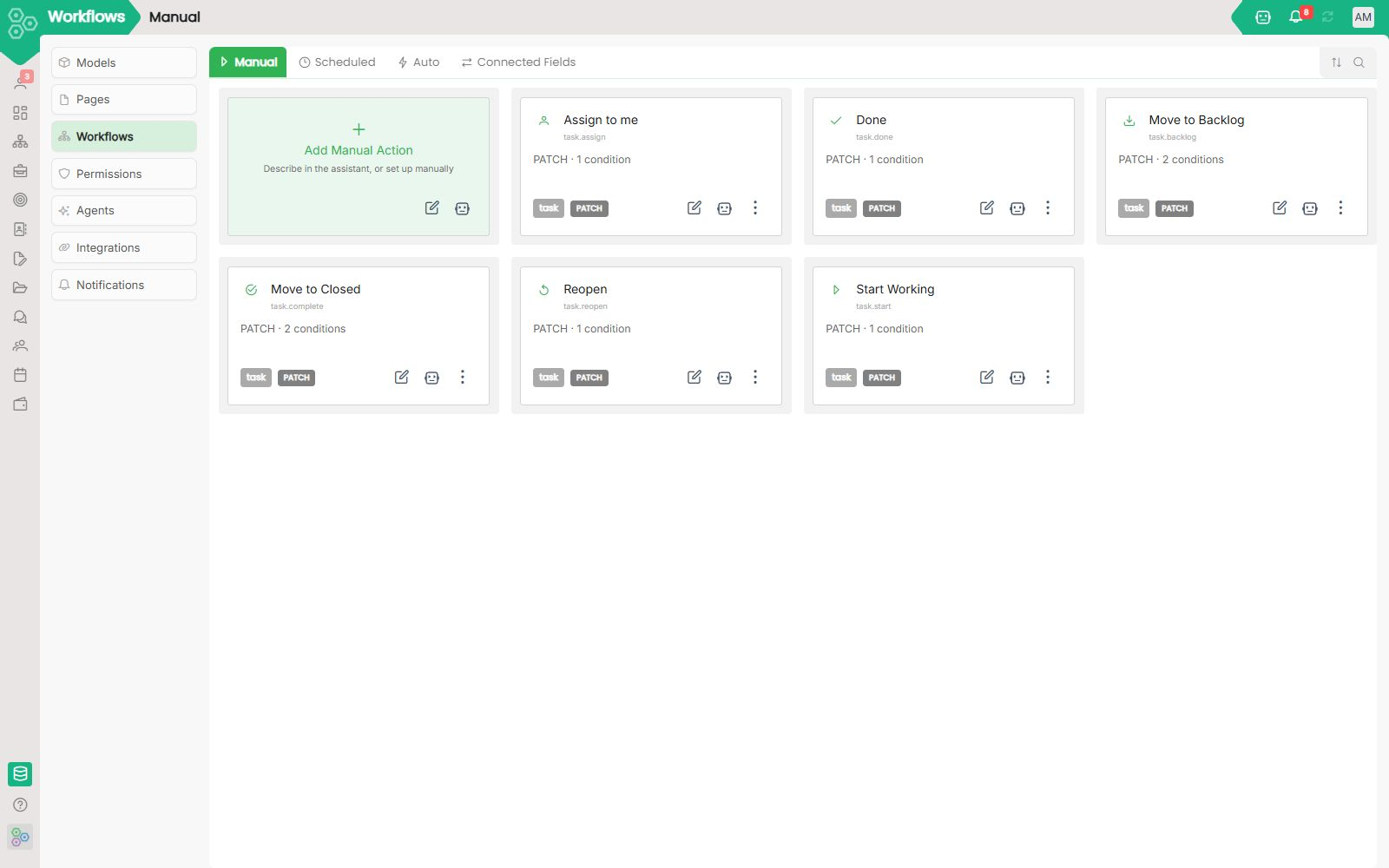
Workflows are how Worknano automates work between modules.
Workflows are how Worknano automates work between modules. Instead of building automation in a separate app and then trying to glue it back to your CRM, projects, or invoices, Worknano puts automation inside the same workspace, the same data model, and the same visual builder you already use.
Use Worknano as an app on desktop and mobile
Install your workspace on desktop or mobile, choose your notifications and keep your business card close. Native apps are in development.
Worknano vs. 1Password: Company Secrets in the Same Workspace as Your Work, Customizable with AI
Most companies do not have a password problem. They have a fragmentation problem.
Worknano vs. Airtable: Stop Managing "Bases" and Start Running Your Business
Airtable is often the "gateway drug" for teams moving away from spreadsheets. It’s colorful, intuitive, and great for prototyping.
Worknano vs. Bolt.new: Build Scalable Corporate Infrastructure, Not Single-Browser Spaghetti Code
Bolt.new (by StackBlitz) introduced a remarkable technical achievement: a full-stack development workspace that runs an entire Node.js development server, terminal, and live preview container directly inside a single browser tab.
Worknano vs. Calendly: Build a Smart Team Presence, Not a Matrix of Messy Links
Calendly is the undisputed pioneer of eliminating the agonizing "what time works for you?" back-and-forth email chain. If you are a solo consultant who just needs a static webpage to let people book a 30-minute chat, it is a perfectly capable tool.
Worknano vs. Canva: Reclaim Unified Team Layout Design Without the Premium Pricing Spikes
Canva completely democratized digital asset creation by replacing complex graphic suites with an intuitive, drag-and-drop template interface. If you are an individual creator spinning up high-level social media banners or editing a single presentation deck, it is a highly accessible web tool.
Worknano vs. Celonis: Enterprise Process Intelligence Without the Multi-Million Dollar Project
Celonis is the absolute titan of the enterprise process mining market.
Worknano vs. ClickUp: Focused Core Functionality, Shaped With AI on One Platform
Most companies do not need more features. They need the few things they do every day to work well together: plan projects, track goals, manage customers, talk as a team, collect information and see where things stand.
Worknano vs. Eventbrite: Events in the Same Place as Everything Else You Run
Most teams do not run events as a business on their own. They run webinars, customer days, trainings, volunteer shifts, partner meetups and community gatherings because those events feed everything else: the pipeline, the onboarding plan, the community, the quarterly goals.
Worknano vs. Framer: A Website That Lives Where Your Forms, CRM and Team Already Work
A website is rarely the end of the journey. A visitor reads a page, fills in a form, becomes a lead, turns into a deal and eventually a customer with projects, events and support questions.
Worknano vs. Lattice: OKRs That Live Next to Your Projects, Customers and People
Most companies set goals in one tool and do the work in five others. The objective lives in a goal platform, the project in a board tool, the pipeline in a CRM and the discussion in a chat app.
Worknano vs. Linear: Project Tracking on One Platform You Shape With AI
Project tracking works best where the rest of the company already lives. Engineering work depends on what sales promised a customer, on the quarterly OKRs leadership set, on support requests arriving from users, and on approvals from people who rarely open a backlog.
Worknano vs. Lovable: Two different approaches to business software with AI
Lovable helps you build an application with AI. Worknano gives you a ready-made business workspace and lets you create additional modules through configuration. Here is what that difference means for your team.
Worknano vs. Make: Automation That Runs Where Your Data Already Lives
Most teams reach for an automation platform because their tools do not talk to each other. Leads arrive in a form tool, deals live in a CRM, tasks sit in a project board, and an external scenario copies data from one to the next.
Worknano vs. Microsoft Teams: Team Chat That Lives Next to Your Records and AI Agents
Many companies end up with a large communication suite because it came bundled with something else. Chat, calls and channels arrive in one package, and the team starts talking there.
Worknano vs. Miro: Turn Your Whiteboards Into Real Database Engines
Miro pioneered the art of the infinite digital whiteboard. If your goal is to hold an ad-hoc sticky note brainstorming session, sketch out an unstructured mind map, or host a casual remote team workshop, it is a highly responsive visual workspace.
Worknano vs. n8n: Native Data Environments vs. Fragile Pipeline Construction
n8n has established itself as an elite, developer-centric powerhouse for building intricate, node-based workflow graphs. If you are an automation engineer who loves writing custom JavaScript transforms, connecting obscure rest endpoints, and managing server infrastructure, it is a brilliantly designed tool.
Worknano vs. Notion: Stop Building Your Own Software and Start Running Your Business
Notion is a beautiful canvas. It is the ultimate tool for individuals who want to build a "second brain" or a pretty wiki.
Worknano vs. Personio: Scale Fast Across Borders Without the Legacy Rigidity
Personio has carved out a massive reputation as the default all-in-one HR platform for European small and mid-sized businesses, particularly in Germany.
Worknano vs. Pipedrive: A Sales Pipeline That Lives Where the Rest of Your Company Works
Pipedrive is a sales CRM built around the pipeline: deals, stages and the activities that move them forward. For a sales team, that focus feels natural.
Worknano vs. Salesforce: Reclaim Simple, Fast Revenue Growth Without the Enterprise Bloat
Salesforce is the undisputed titan of legacy corporate software.
Worknano vs. Slack: Work Chat Where Your Records and AI Agents Already Live
Most teams adopt a chat tool to talk faster. Then the talking drifts away from the work.
Worknano vs. Trello: Kanban Boards Connected to Your Goals, Customers and Team
A kanban board is only as useful as the context around it. A card that says "Update onboarding flow" tells you very little on its own.
Worknano vs. Typeform: Stop Paying Premium Rent for a Fancy Front Door
Typeform revolutionized data collection with its sleek, one-question-at-a-time conversational interface. If you need a beautifully polished survey to capture high-level consumer feedback, it is a highly capable design tool.
Worknano vs. Webflow: Escape the Class-Naming Grind and Rigid CMS Ceilings
Webflow is an absolute powerhouse for pixel-perfect visual design, giving frontend creators unparalleled control over CSS properties and layout animations directly inside the browser canvas. For design agencies building highly stylized, static corporate portfolios, it is an exceptionally robust interface.
Worknano vs. WordPress: Break Free from Plugin Hell and Constant Security Audits
WordPress is the foundation of the traditional web, currently powering over 40% of the internet. If you are building a straightforward content blog and have an IT squad dedicated to managing manual server stacks, caching frameworks, and weekly security updates, it is a highly understood piece of legacy software.
Worknano vs. Zapier: Stop Paying the "Automation Tax" for Tools That Should Already Be Connected
The modern startup tech stack has a dirty secret: we are all paying a "tax" just to make our software talk to itself. Zapier has become the duct tape of the internet, and we have normalized paying monthly subscriptions to manage our other subscriptions.
Worknano vs. Zoho: One Platform, One Database, One Experience Instead of a Suite of Apps
Zoho sells a large catalog of business applications, and Zoho One bundles many of them under one subscription. That is a suite: a collection of separate products, each with its own interface, its own settings and its own way of storing data, connected to each other after the fact.