
Semantic search: ask your workspace in your own words
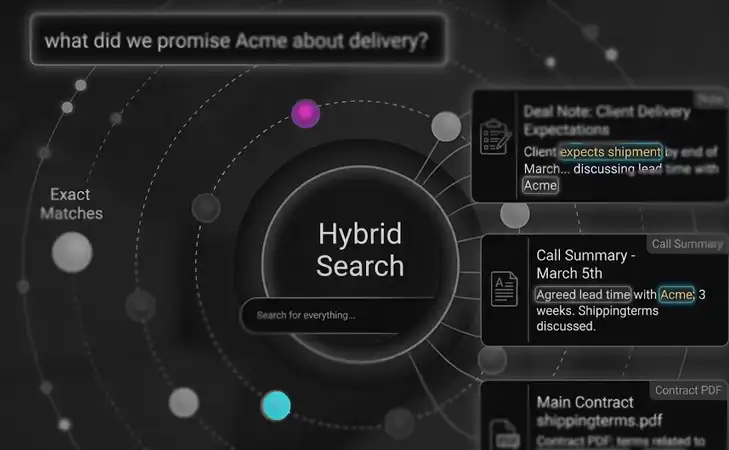
Most search boxes match words. If you don't remember how something was phrased, you don't find it. Worknano searches by meaning. Ask "what did we promise Acme about delivery?" and you get the deal note "Client expects shipment by end of March", the call summary "Agreed lead time with Acme: 3 weeks" and the shipping terms in the contract PDF, even though none of them use the word "promise".
It works across everything in your workspace, including every file you upload, and it is included in every plan at no extra cost.
Ask the way you would ask a colleague. Worknano understands what you mean and shows you where it lives.
1. One question across all your work
Documents, tasks, projects, deals, contacts and OKRs all answer the same question. Specs, decks, meeting notes, your pipeline and your goals no longer sit in separate corners. You don't need to remember which tool, which folder or which word someone used, because everything is in one workspace. Data you import from connected tools becomes searchable too.
New team members find the decision itself, not just the folder it might be in.
2. AI agents that know where to look
The AI Assistant and AI agents use the same index. Instead of reading whole documents, they read only the passages that matter, then write their answer from them. Answers arrive faster and stay grounded in your team's own content.
Because the data lives in Worknano, an agent can act on what it finds. It can create a task from a finding or update a deal, always within the permissions of the person asking.
3. Built to be trusted
- No extra cost. Semantic search is included in your plan. Indexing and searching your content does not use up your AI credits.
- Always current. Content is indexed automatically whenever it is created or changed.
- Same permissions as everything else. People only find what they are allowed to read. Restricted fields are never indexed.
- Your region, your data. Choose regional hosting in the EU, the USA or APAC. Your workspace data and AI processing stay in that region, and embeddings are stored in your workspace's own database.
- Available per workspace. Semantic search is enabled for each workspace individually, so you decide when it goes live for your team.
4. Under the hood
- Passages (chunking). Every searchable text is split into short passages: titles, descriptions and the text extracted from uploaded PDF, Word, Excel and PowerPoint files.
- Embeddings. A vector model turns each passage into a list of numbers that captures its meaning. Passages with similar meaning land close together.
- pgvector in your own PostgreSQL database. Vectors are stored right next to your data in your workspace's own database, not in an outside search service.
- Hybrid ranking (meaning + keyword). Your question is turned into a vector the same way, and the closest passages come back. Results are combined with classic keyword search, so exact names, codes and ticket keys still come out on top.
- Retrieval-augmented generation (RAG). The AI first looks up the relevant passages, then answers from them instead of guessing from general knowledge.
One workspace, one search
One place for your work, one search across all of it, and only the context that matters. Ask in your own words and let Worknano find the rest.