
Meeting booking built into your team profiles, not tacked on
Most scheduling tools require you to manage messy external links that sit outside of your main business profile. Worknano Booking integrates your calendar right into your public-facing team presence. It turns every employee's profile into an interactive scheduling hub, making it effortless for clients, partners, or candidates to secure time without the back-and-forth email chains.
Your personal scheduling hub
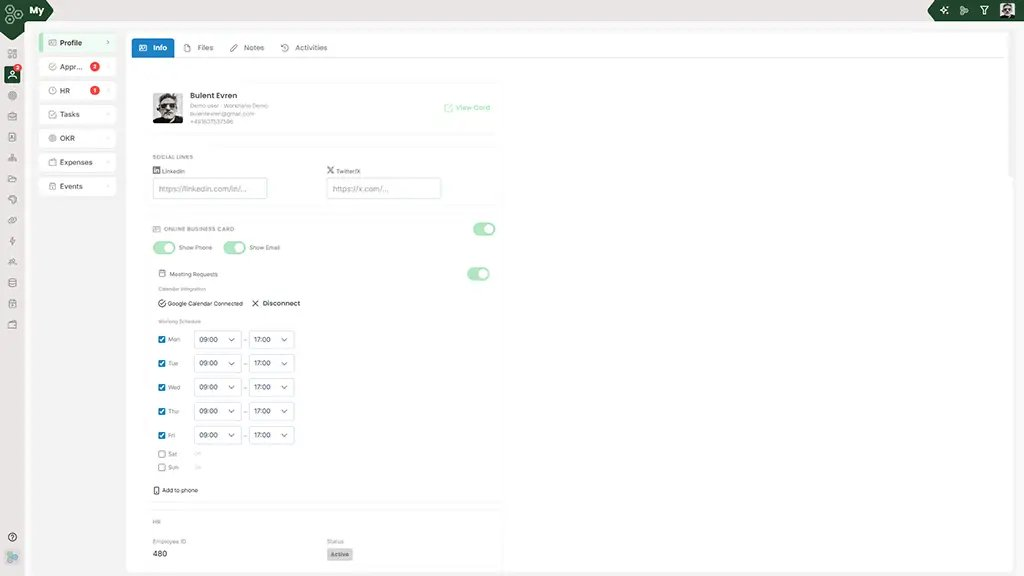
Your scheduling preferences live right inside your central Profile screen under the Info tab. Here, you can manage your direct professional details, update your custom Social Links for LinkedIn and Twitter/X, and control your public visibility. With a simple toggle, you can activate your Online Business Card, decide whether to Show Phone or Show Email, and turn on Meeting Requests instantly.
Real-time calendar sync and custom schedules
You never have to worry about getting double-booked. The platform reads your live availability directly via your integrated Google Calendar or Microsoft 365 setup, displaying a clear Calendar Connected status. It automatically references your custom Working Schedule grid. You can check specific days from Monday to Friday, configure exact hour ranges like 09:00 to 17:00, and leave weekends marked as Off so you only get booked when you are truly ready to meet.
What the visitor experiences
When someone visits your public profile, they are greeted by the clean, interactive layout. Visitors see an elegant mini digital business card featuring your image, title, and quick-action buttons to Call, Email, or Meet. Hovering over the calendar trigger displays a clear Schedule a meeting prompt. From this screen, guests can click to instantly view available slots, choose a day, drop in their details, or even hit Save Contact to download your card directly to their device.
Scan, save, and install instantly
Sharing your booking presence in the physical world is just as seamless. The system generates a dedicated high-resolution QR code right alongside your scheduling profile. Prospects can scan it with their smartphone camera to open your card instantly on mobile, or click Install as App to save your business card directly onto their home screen for future one-tap access.
Tenant defaults and flexible fallbacks
Setting up your entire organization is handled in seconds. Administrators can configure global tenant defaults under Branding and Profile defaults, establishing company-wide working days, core hours, default meeting durations, necessary buffer times between appointments, and maximum advance booking limits. If an individual team member hasn't synced a personal calendar yet, the system gracefully falls back to these tenant rules. Once a meeting is confirmed, calendar invites are dispatched, the host's schedule updates automatically, and a handy.ics file download is offered to the guest.
[FAQ-CATEGORY:booking]