
Integrations: connect your stack in clicks, not tickets
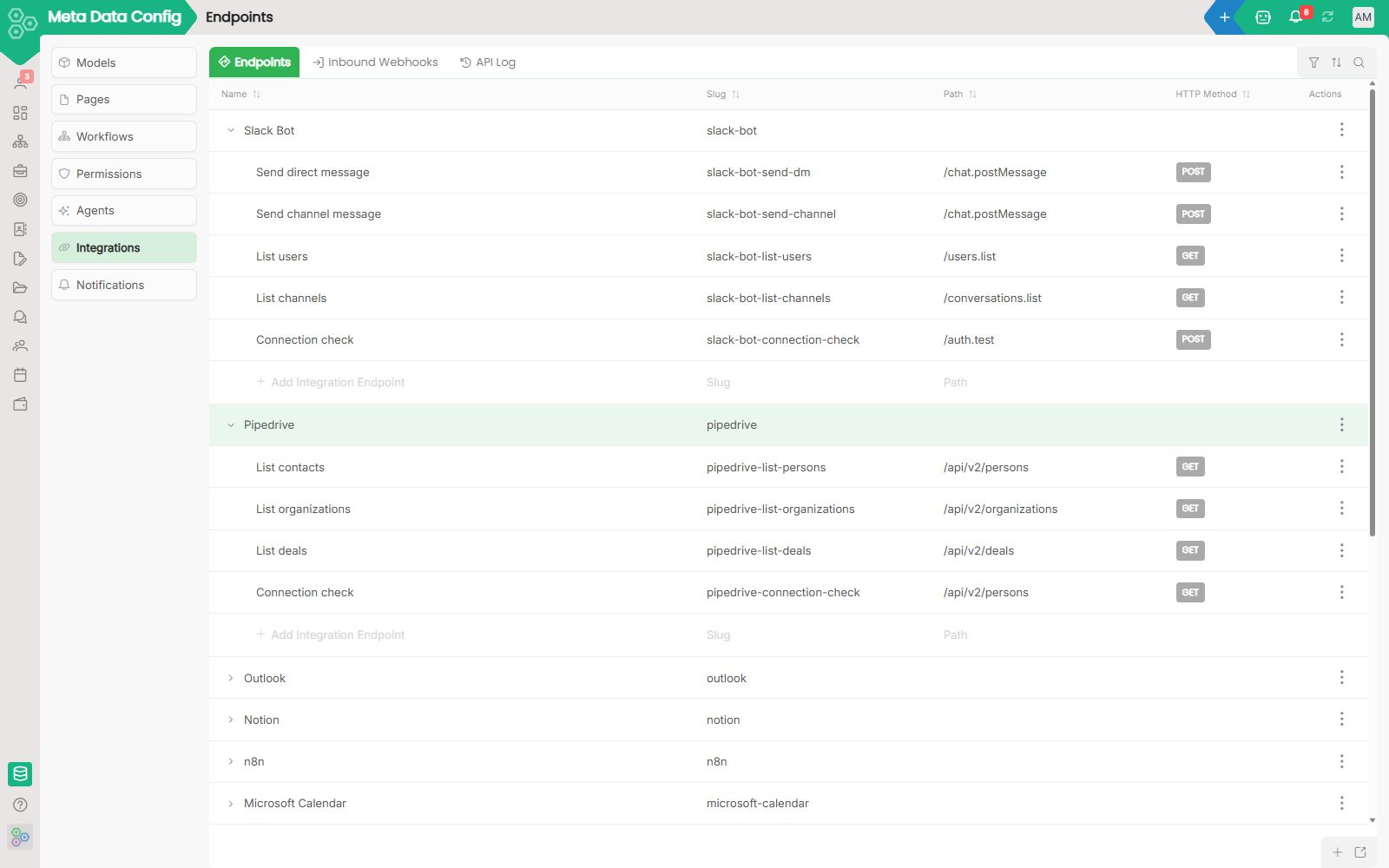
Integration is where SaaS dreams go to die. The vendor's marketplace lists your tool, you click connect, you wait three minutes, and either nothing happens or it only works for the one trivial case the demo covered. Worknano Integrations solves this with two powerful layers: a curated set of native connectors that we own and ship-quality test, and a visual builder that lets you create custom integrations directly inside your dashboard modules, no backend or frontend coding required.
Native connectors that we maintain
We provide deeply integrated, well-tested connectors for the tools you use daily:
- Google Workspace and Microsoft 365 (mail, calendar, drives, identity)
- Slack, Microsoft Teams, Discord for notifications and ChatOps
- Stripe, PayPal, Adyen for payments and billing
- QuickBooks, Xero, Sage for accounting handoff
- GitHub, GitLab, Jira for engineering loops
- Plus bridges for everything else off-the-shelf
Custom connectors without a backend project
The visual integration builder lets you wire any REST or GraphQL API in just a few minutes. Define authentication, map fields, set schedule triggers, configure retry policies, all directly inside your dashboard modules. The connector becomes a first-class citizen of your workspace. Operations teams can build and maintain integrations without any engineering involvement.
Webhooks both ways
Outbound webhooks fire on any record event so external systems can react instantly. Inbound webhooks turn external events into records, comments or workflow steps inside Worknano. The entire pipeline is fully observable: every payload, every retry, every failure can be replayed with one click.
Permissions, scoped
Each integration runs with its own scoped credentials. Field-level mapping ensures an integration can only write to the fields you explicitly allow. The audit log captures every external call, so security reviews are quick searches, not long projects.
Examples that ship today
New CRM deal closed → create invoice in Xero, send payment link via Stripe, notify team in Slack.
Support ticket updated → create task in Jira and post update in Microsoft Teams.
New job application received → create candidate record and add to Google Calendar interview slot.
Payment received → update invoice status and trigger internal approval workflow.
Prefer working in Claude, Cursor or Codex? Connect them with MCP and they work on the same records, with your permissions.
[FAQ-CATEGORY:integrations]