
AI Agents: automate tasks with prompts, not code
Every workspace accumulates work that follows a pattern: read this record, summarise it, draft a reply, classify the input, generate a document. Doing it manually every time is waste. Building a custom integration every time is overhead. AI Agents in Worknano let you define that pattern once, as a prompt with typed inputs and a structured output, and run it on demand or as part of a Workflow, from anywhere in the workspace.
What an agent is
An agent is a reusable AI task. You define:
- A name and description, what this agent does, in plain language.
- Required inputs, the fields the agent needs each time it runs (a deal name, a support ticket body, a candidate CV, a product description).
- A system prompt, the standing instruction that shapes the agent's role and tone ("You are a senior sales consultant reviewing deal summaries…").
- A user prompt, the dynamic instruction that combines the system context with the actual inputs at run time.
- Output type and format, Text, structured JSON Object, Array, or a direct action: create a record, update a field, trigger a Workflow.
- AI model: Choose a supported provider or a compatible local, self-hosted or organization-approved model, depending on your deployment. Match the model to the task, your budget and your data policies.
What it can output
An agent is not just a chatbot reply. The output can be:
- Text, a summary, a draft email, a risk assessment, a job description.
- A record, create a new CRM contact, project task, or support ticket from extracted data.
- An update, write the output directly into a field on an existing record.
- A Workflow trigger, kick off an automation based on what the agent decided.
- Structured data (Array or Custom), extract line items, tag a list of leads, classify a batch of entries.
Single mode runs the agent once per invocation. Multiple mode runs it across a list and returns one output per item, useful for bulk enrichment, batch classification, or mass email personalisation.
Where agents run
- On a record, an action button on any detail view triggers the agent with that record's fields as inputs. No copy-paste into ChatGPT.
- Inside a Workflow, agents are first-class Workflow steps. Run them automatically when a deal reaches a stage, a ticket is created, a form is submitted, or any other trigger fires.
- In bulk, select a list of records and run the agent across all of them at once.
Finding the right context. Agents and the assistant use semantic search to find documents, tasks, deals, contacts and OKRs by meaning, not just exact keywords, including text inside PDF, Word, Excel and PowerPoint files. Results follow the same permissions as the rest of your workspace, and restricted fields are never indexed.
Practical uses out of the box
- Summarise a long support ticket before assigning it to a team member.
- Draft a personalised follow-up email from a CRM deal's last activity.
- Score a job application and write a structured evaluation note.
- Classify an expense description and suggest the correct budget category.
- Generate a project brief from a client intake form submission.
- Extract structured line items from a scanned invoice and populate Finance fields.
Managed AI, with deployment choices
Start with Worknano’s managed models without setting up your own AI infrastructure. If your organization requires a particular provider or a private model deployment, compatible endpoints can be configured to meet your company’s data policies or public-sector requirements. Temperature is adjustable if you need consistent outputs (lower) or creative variety (higher). Examples can be attached to guide the model on edge cases. You choose regional hosting in the EU, the USA or APAC, and your workspace data and AI processing, including model calls and search embeddings, stay in that region.
Agents and Workflows together
The real leverage comes when agents and Workflows combine. A Workflow detects a new inbound lead, passes it to an agent that scores and classifies it, writes the score back to the CRM record, and routes it to the right sales rep, all without a human in the loop. The audit log captures every agent invocation with its inputs, output, model used, and latency, so nothing happens invisibly.
The agents that come with Worknano
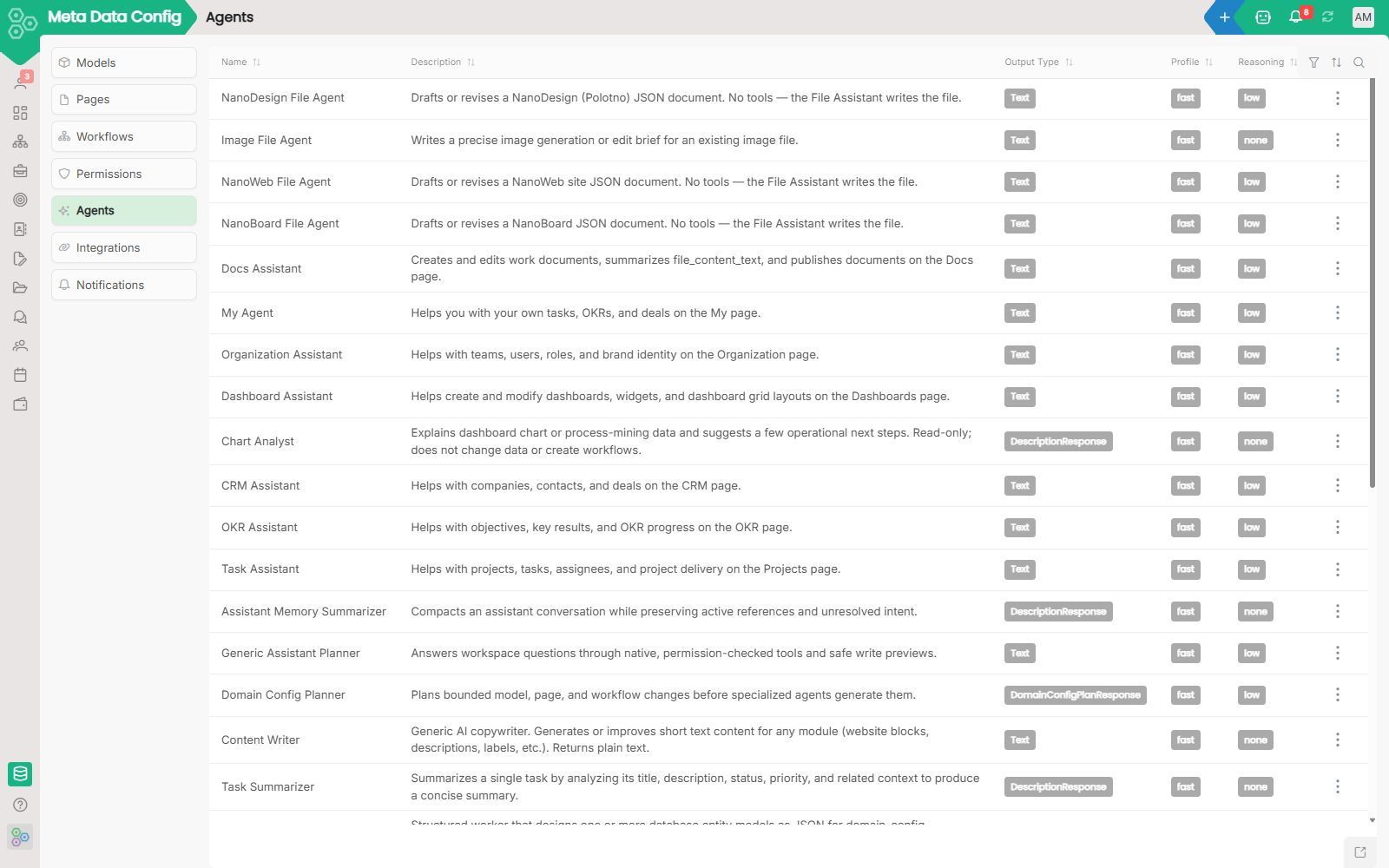
Every workspace starts with these ready-made agents. Each one is a record you can edit.
- Data Hygiene Assistant: finds missing data and helps you fix it
- Task Assistant: the agent that runs your Projects page with you
- OKR Assistant: updates and explains your OKRs in plain words
- CRM Assistant: the agent that keeps companies, contacts and deals in order
- My Agent: your personal assistant for tasks, OKRs and deals
- Docs Assistant: write, read and organise documents with an agent
- Dashboard Assistant: build dashboards and widgets by asking
- Organization Assistant: manage teams, people and brand in plain words
- Chat Agent: answers a mention in a thread with real data
- Content Writer: writes and improves short text anywhere
- Meta Data Assistant: build and change your setup by talking to it
- Key Result Validator: checks that a key result is measurable
- Objective Validator: checks an objective against its goal and key results
Browse all agents or learn how to build your own agent.
[FAQ-CATEGORY:ai-agents]
Prefer working in Claude, Cursor or Codex? Connect them with MCP and they work on the same records, with your permissions.