
Permissions: roles, access, and who can see what
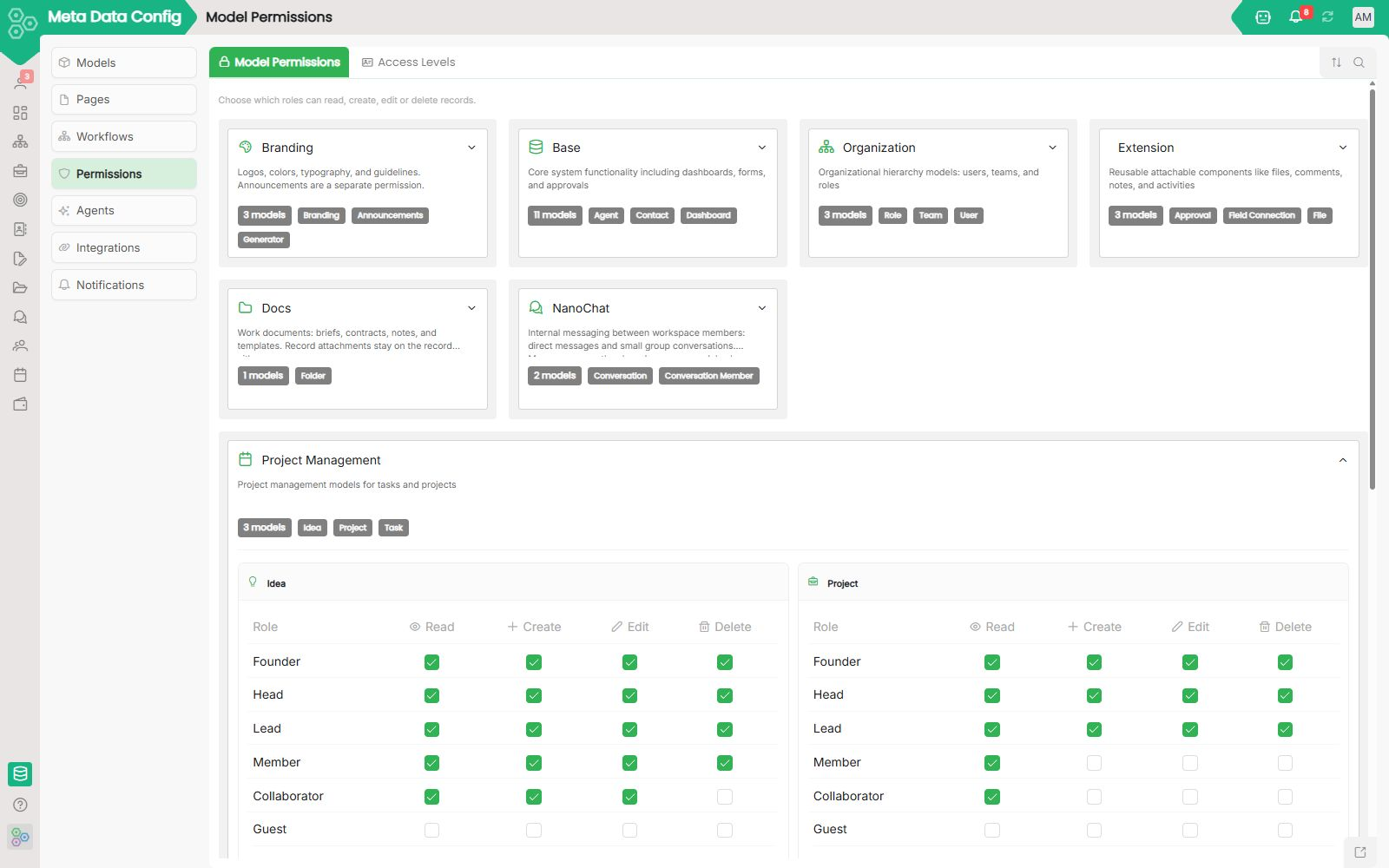
Permissions: Roles, access, and who can see what
Most teams manage permissions separately in every tool, one matrix in the CRM, another in finance, a third in file sharing. Worknano centralizes access control in one place. You define roles (what a type of person can do), assign them to users, and optionally narrow what records they can see with row-level rules. The same rules apply consistently across CRM, projects, HR, files, dashboards, and every custom module.
Roles are the starting point
A role is a reusable permission profile, “Sales Rep”, “Finance Admin”, “Support Agent”, “Director”. For each role you control:
- Which modules appear in the sidebar (or remain hidden)
- Which actions are allowed per module: read, create, update, delete, export, share, approve
- Which fields are visible, read-only, or completely hidden
- Which pages and menu items users can access
Assign a role once, every list, form, board, and report inherits it automatically. Update the role definition and it applies instantly to everyone.
Model permissions: the same pattern everywhere
Every module is built on a data model. Permissions are defined at the model level, not hardcoded per screen. This includes read, create, update, delete, and approve rights. When you create a new custom module, it automatically gets the same full permission grid.
Row-level access: same role, different records
Two people with the “Sales Rep” role can see completely different pipelines. Row-level rules let you scope access by:
- Records owned by the current user
- Records in their team or division
- Any filter expression against the data model (region, status, tag, etc.)
Pages, fields, and workflows
Permissions go beyond module access:
- Page-level rules hide entire tabs or admin screens
- Field-level rules protect sensitive data like salary or internal notes
- Workflow actions can require specific roles or approvers from the org chart
Organization ties it together
When connected to your Organization structure (teams, managers, divisions), approvals route automatically and row-level rules can reference “my team” dynamically. Reorganize once, permissions and routing update everywhere.
Audit and review
Every important action, role changes, permission grants, sensitive updates, exports, is logged with who did what and when. Admins can review access, compare roles, and revoke permissions in bulk.
[FAQ-CATEGORY:permissions]